Showing posts with label RestrainedLife. Show all posts

Monday, March 11, 2024

RLV 2.9.34

Hi !


I wasn't sure about releasing this version, but two crash-to-desktop (CTD) bugs coming close to each other kind of forced me to.

The first CTD occurred when receiving a folder to #RLV from an object, with a name containing slash characters ("/"). Normally, when this happens, the RLV cuts the name into individual parts, removing the slashes, and creates as many folders with the corresponding names, parenting them in a chain of folders.

For example, when the folder is named "#RLV/~A/B/C/D", the viewer would create this structure :

#RLV

| some folder

| some other folder

\ ~A

    \ B

        \ C

            \ D (this is the original "#RLV/~A/B/C/D" folder, renamed and parented to the ones above)

                | Item

                | Item

                \ Item


Better, it ignores the folders that already exist so your inventory is not unnecessarily cluttered. So if ~A and B already exist, the viewer would create only C and D. However, if D already exists, a new D folder would still be created since we don't want to pollute existing folders with additional items (because the RLV works with folders, not with items), leading to potential doubloons.

But since the addition of folder thumbnails, that feature failed spectacularly, crashing the viewer. I won't go into boring technical details, but that's the kind of stuff several viewer devs have been scratching their heads about. In short, that code relied on a client-server process that simply doesn't exist anymore, so we have to do it another way.

This version of the RLV has a tentative fix to it, at least it won't crash anymore, and the folders seem correctly created, but it seems to work only once or twice in a row, after that strange things may happen to that folder (the received folder is not renamed correctly, or it is named correctly but not parented correctly, or both). The "strange things" won't ruin your inventory, don't worry.


The other CTD bug would happen when entering some Chinese characters in chat or in IM. I could reproduce this bug in 2.9.33 (the first version with PBR), but I must admit, I don't speak or read a word of Chinese so that was just me monkeying on my keyboard until it broke (the viewer, not my keyboard). Problem is, that crash is violent and the viewer log does not contain any relevant error. I could never crash this version, which includes emoji support, and probably some fixes from LL about that precise crash. But I didn't see anything about hat in Git. Nevertheless, no amount of monkeying on my part could crash this version, so I'm hopeful that this is fixed. I'll need someone who actually speaks and reads Chinese to confirm that 2.9.34 does not crash for them.


You can download the Windows version from http://www.erestraints.com/realrestraint/

The MD5 hash for the Windows version is :
6ab8ea2f7b525f20e16acf0babf59507

The Linux and Mac versions are proposed by Chorazin at this address :
https://sourceforge.net/projects/kokua.team-purple.p/files/RLV/


Have fun !

Marine


Friday, February 23, 2024

RLV 2.9.33

Hi !


After quite a while integrating and testing this version, here is the RLV with Physically Based Rendering.


Here is the changelog. It may seem small, but integrating PBR into RLV was no small feat. That task was mostly done by Chorazin Allen for Kokua. Thanks Chorazin !


- switched to PBR (Physically Based Rendering) to be up-to-date with the 7.1.2 SL viewer codebase.


- known issue : rigged mesh hair (and other rigged alpha-blended surfaces) pokes through @setsphere.


- known issue : materials are rendered normally when @camtextures is active, instead of being gray. This is because at the moment they are rendered during the rendering cycle, there is no way to tell what object a material is attached to, hence whether the object is in-world or attached. So they are all rendered normally instead of made all gray indiscriminately.


You can download the Windows version from http://www.erestraints.com/realrestraint/

The MD5 hash for the Windows version is :
b805131a271a2cc5b19a85d64caab6fd

The Linux and Mac versions are proposed by Chorazin at this address :
https://sourceforge.net/projects/kokua.team-purple.p/files/RLV/


Have fun !

Marine

Tuesday, December 20, 2022

RLV 2.9.32.1

Hi !

Here is a new version of the RLV, this time based on the codebase of the SL viewer v6.6.8, with many improvements. In particular, rendering and speed. No kidding, the FPS has kind of doubled with this version ! I didn't have time to look into invisiprims and from what I saw, it would be difficult, if not impossible, to make them work again.

 And there's still nothing done to replace them which is a problem because they're the only way to dynamically hide body parts with a script (by hiding and showing the invisiprims). Of course, one may say that this is possible with alpha masks, but they're wearables and require a RLV viewer and some preliminary user action to use automatically (namely, put them into a particular folder and make the script point to that folder, it is not trivial for non-technically minded people). It would also be possible with auto-hide HUDs from Maitreya, for instance, but these things have to be done for every mesh body around, which is not the case.

So for now we have a viewer that works well and fast, but without invisiprims, sadly. And like I said before, I know that invisiprims are ugly and a hack and all, but they're the only solution to one specific problem.

Thanks a lot to Chorazin Allen for keeping the RLV repository up to date with LL's many changes, I certainly wouldn't have had the time to do it myself these days.


You can download the Windows version from http://www.erestraints.com/realrestraint/

The MD5 hash for the Windows version is :
97cb2a86ea5178c395c672461ba3a1df

The Linux and Mac versions are proposed by Chorazin at this address :
https://sourceforge.net/projects/kokua.team-purple.p/files/RLV/


Have fun !

Marine


PS : I can't wait to show you what I'm working on. Because yeah, it is about bondage and kinkiness, and is more or less related to SL even if it's not an SL product. I won't say more about it yet, though, but I can't wait to demonstrate something ! This past year and a half has been the busiest time of my life because of this project.

PS 2 : I can't wait to get back to working in SL, either. It would be like vacations for me. lol.


Tuesday, June 7, 2022

RLV 2.9.31.0

 Hi !


This is my first post in over a year... I'm still taken by this RL project which is why I'm quiet these days, but I'm not gone, just quiet and very busy.

In the meantime, it seems that LL hasn't been idle either and released a new viewer that kind of breaks some system libraries which makes the previous RLV unusable, so here is a new version based on LL's v6.5 codebase that should work again.

It doesn't contain bug fixes or improvements, it is just meant to stay up-to-date with LL's latest viewer. Actually, at the time of this writing, the latest SL viewer is 6.6 and I have a working RLV based on that one, except it breaks invisiprims. I know, invisiprims are evil, ugly, they're a hack and so on, and the SLV and FS only support them in forward rendering, but I'd like to keep supporting them in deferred rendering as well as long as we don't have another way of dynamically hiding rigged mesh parts with scripts. Not everyone uses BoM and not every mesh body has alpha cuts. Like it or not, invisiprims still have some usefulness so the RLV based on 6.6 is not ready yet. This one here is okay, though.


You can download the Windows version from http://www.erestraints.com/realrestraint/

The MD5 hash for the Windows version is :
584642732aab6c915823ad3d6092ddb8

The Linux and Mac versions are proposed by Chorazin at this address :
https://sourceforge.net/projects/kokua.team-purple.p/files/RLV/


Have fun !

Marine


Wednesday, May 19, 2021

RLV 2.9.30.1

 Hi !


First of all, apologies for being quiet for so long, all my time is taken by an RL project these days. It might be tied to SL actually but I won't comment on it yet. All I can say is that it's big so it's taking all my time for now. But no worries, there's a lot of work on my plate in SL as well, for example Xuxu needs a bit of love because there are bugs that still need to be fixed. So I'll get to that when I can.

Here is the latest version of the RLV with a few bug fixes and the latest code from LL. This RLV has been ready for release for a month already and I... kind of forgot to ship it. Sorryyy !


- fixed : couldn't @attach an item located inside a temporary RLV folder (thank you Jenna Huntsman for the heads-up)

- fixed : #RLV/~a/b/c became #RLV/~a/b/c at the next login

- fixed : declining #RLV/~a/b/c created the folders anyway


You can download the Windows version from http://www.erestraints.com/realrestraint/

The MD5 hash for the Windows version is :
3dd6953c1e34436f78a8819a1083ea81

The Linux and Mac versions are proposed by Chorazin at this address :
https://sourceforge.net/projects/kokua.team-purple.p/files/RLV/


Have fun !

Marine


Monday, March 15, 2021

RLV 2.9.30

Hi !

Here is a new version of the RLV which is dedicated to taking a couple features from RLVa, namely "@setsphere" and the ability to create sub-folders when giving a folder to #RLV directly.

I said in my last post that this was the last time I integrated proofs of concept RLVa commands that make their way into Firestorm without filter. But that was without taking into account Kitty Barnett's new "@setsphere" commands which she worked on for a long time and that are now going to go into Firestorm, once again without any filter.

But I know that users have been eagerly waiting for years for an equivalent of the @cam commands to simulate blindfolds and other vision restrictions that are present in the RLV and Kokua viewers but not in Firestorm which is by far the most popular viewer. It was frustrating for them so I expect scripters will jump on the opportunity to use these commands as soon as they are released. That's why I can't just ignore this new set of commands since they will become popular in no time. Problem is, they are not in the RLV API so if they start using them and I don't do anything, there might be a significant difference once they actually make it to the API and it will be too late then.

So this version (2.9.30) includes Kitty's "@setsphere" commands, working the same way as in RLVa with two key differences that I will explain below.

The second feature is being able to create sub-folders when a script gives a folder to the user's #RLV folder. For example, before this version, giving a folder named "#RLV/~A/B/C" would create a folder "~A/B/C" and put it under #RLV, just like that. Not very handy especially since RLVa would actually create folders "~A", "B" and "C", and organize them the way you'd expect. Since this version here, RLV does the same now which is :

- Create a folder C (in all cases, the last folder in the path is created so we don't pollute an existing folder with new items).

- Create the other folders in turn and organize them, but only if they don't already exist. For example, if your inventory already contains "~A" and "B" inside "~A", it won't create them but it will reuse them, placing the new folder "C" under the existing folder "B" (regardless of the fact that there might already be a folder "C" there since, like I said, the last folder in the path is always created, never reused).

That way, RLV functions exactly like RLVa on these features from version 2.9.30.


Here is the change list :

- Added : Support for @setsphere like in RLVa (with a significant difference : "=force" commands become "=n" commands).

- Changed : Giving a folder to #RLV will now create nested sub-folders if the name of the folder contains slashes ("/").

- Fixed : Defensive fix against a potential crash when using @camtextures (thanks Henri Beauchamp for the heads-up).


You can download the Windows version from http://www.erestraints.com/realrestraint/

The MD5 hash for the Windows version is :
9dc39253a79954e3b926c8d8cc2127d3

The Linux and Mac versions are proposed by Chorazin at this address :
https://sourceforge.net/projects/kokua.team-purple.p/files/RLV/


Now, you might have noticed the "significant difference" part in the change list about @setsphere. Read on if you want to know more.

All the "=force" commands designed by Kitty are turned into "=n" commands (*). The reason for this is the way the parameters must be mixed when two or more objects issue identical "@setsphere_mode" commands but with different parameters. In RLVa the result is random, whoever comes last wins or something like that. In RLV they are properly mixed to retain the most restrictive parameters.

For example, if two objects issue "@setsphere_mode:0=n" (that's "restrict the vision with a plain color gradually becoming more opaque over the distance) then one issues "@setsphere_distmax:3=n" and the other @setsphere_distmax:10=n" afterwards, the second command will be retained like the first one but the actual distmax parameter that will be applied will be "3" because it is more restrictive.

(*) Actually the RLV accepts both because there might be scripts already using @setsphere the way Kitty designed it, but the RLV API will only specify "=n", not "=force" because the latter is bound to cause issues and is not consistent with the way the RLV works.

The "force" commands are not retained in the main RLV map, they are forgotten as soon as they are executed, so they cannot be consulted afterwards by scripts. Those "force" commands are "one-shot" commands that are meant to force the avatar to do something, like sit somewhere or teleport, but not configure a command that itself sticks around.

Another difference is the separators in the "@setsphere_param" command. The API will specify that ";" is needed but RLVa takes "/" for the time being. However, "/" is more reserved for folders than actual separators than for multiple parameters (I know, "@tpto" seems to be an exception, it was done this way to facilitate turning an slurl into an actual RLV command, it sounded like a good idea at the time) so ";" it is.


Also, it is too soon to add anything to the RLV API about @setsphere. I don't know yet if it is a good idea, for example there are issues with alpha-blending which I am not sure Kitty will be able to solve. I would also like @camdraw commands to be replicated in RLVa, at least becoming synonyms for @setsphere commands. In short, "@setsphere" is still more or less a command in testing.

However Kitty raised an issue with @camdraw commands in RLV : the view seems darkened far before the actual outer limit. There is a reason for this, the spheres are alpha-blended and stack one after the other in a linear way (that's 40 concentric spheres between @camdistmin and @camdistmax).

Problem is, when two alpha-blended surfaces overlap each other, the resulting transparency is a multiplication of both transparencies. As a result, the concentric spheres blend in an exponential way, resulting in an apparent darkness occurring a lot closer than it should. The spheres are placed correctly though and the initial requirement was to make it so @camdrawalpha commands were exact. If you specify that the outer alpha should be 75% (hence 25% transparent), then any white fullbright surface beyond that distance should appear 75% grey, and it works. The reason for this apparent bug is that the spheres are placed linearly. I could place them differently (logarithmically for example) but then this would break existing products using those commands. Adding new @camdraw commands would require to think long and hard on how to mix them.

Anyway, this is the reason why @setsphere is a different set of commands from @camdraw but it would be great to find a way to set a bridge between them, after all they both do the same thing.


Have fun !

Marine


Monday, February 1, 2021

RLV 2.9.29

Hi there,

Here is a new version of the RLV, this one is a big one because it includes many new RLV commands on top of a few bug fixes and changes.

Normally it should have been 2.10 but none of the new RLV commands is a real game changer like the vision restriction spheres in 2.9 so it stays a 2.9. It's not really important anyway.

Here is my personal take on the matter of most of the new commands included in 2.9.29. The technical stuff and the actual release notes follow after the part in italics.

Most of the new commands were actually already present in Catznip and I've added them to the RLV for consistency concerns. They're mostly about EEP and how to keep controlling the environment settings with EEP the same way we used to with Windlight, without having to rewrite any script. Problem is, RLVa 2.3 brought in commands with a different syntax than those in the RLV API 2.9.27.

As a result, RLVa was forking even further from RLV and for the sake of the scripters (and their sanity), it is not good to have two nearly but not entirely identical APIs. On top of it, RLVa goes straight into Firestorm (without filter as far as I know, but I'd love to be corrected on that) which is by far the most popular viewer so when a command is added to RLVa, some people assume they are in the RLV as well. This is why most of the new RLV commands in 2.9.29 are taken from RLVa.

There is one simple rule though : if a command is not in the RLV API, it is not an RLV command and scripts should not assume they are.

This is the last time I do this. In order to keep RLV a single API which scripters can rely on for its consistency, all the people working on different implementations of the RLV API must understand that forking is not the most sensible thing to do. Having different implementations that interpret the API differently, or even having commands that are part only of some implementations only confuses users (scripters and end users alike) and increases everybody's workload.

I do understand that when someone wants to add a new command to the RLV API, they have to ask me and I'm the one to do the work on the specification and first implementation (because it has to be tested, right ?), which is not always possible. I consider every suggestion carefully and I say no more times than I say yes, provided I have time at all. So I do understand that other viewers implement their own "test" commands on their side as proofs of concept. I have no problem with that as long as they stay test commands and proofs of concept, but injecting them into popular viewers without getting back to me first is bound to cause issues because suddenly the proofs of concept become mainstream commands without being in the API. That's when things become ugly for scripters and end users.

This applies to Catznip because that's the one that I know about, but there are perhaps others. Of course, if the test commands in Catznip are not transferred into Firestorm when the latter publishes a release, then this whole rant personal take is moot and to be ignored.


Alright, on to the interesting stuff.


- added : A slew of new "setenv" and "getenv" RLV commands, some of them to match the new ones in Catznip : asset, cloudtexture, sunscale, suntexture, sunazimuth, sunelevation, moonazimuth, moonelevation, moonbrightness, moonscale, moontexture.

- added : Support for vectors in the following "setenv/getenv" commands : ambient, bluedensity, bluehorizon, cloudcolor, cloud, clouddetail, cloudscroll, sunlightcolor. Attention : although ";" and "/" are acceptable as separators in the "setenv" command, the "getenv" command will separate the numbers with ";" only to remain consistent with other RLV commands ("/" is supposed to be for folders, it is not a separator).

- added : Show "Typing" above the head of the avatar even when its chat is redirected (this brings a new debug setting named "RestrainedLoveShowRedirectChatTyping").

- added : New RLV command @shownearby (thank you Chorazin Allen for the code).

- added : New RLV command @touchattachother:UUID to prevent from touching a specific avatar's attachments.

- added : New RLV command @share (with its _sec variant as well as share:UUID exceptions) to prevent the user from giving anything to anyone, with exceptions.

- added : New RLV command @sitground to force the avatar to sit on the ground where it stands (in fact it will just sit where it is, even if it is flying, it's not necessarily going to sit on the ground below).

- added : New RLV command @editworld to prevent the user from editing objects rezzed in-world but not their own attachments (no exceptions).

- added : New RLV command @editattach to prevent the user from editing their own attachments but not objects rezzed in-world (no exceptions).

- added : New notification when sitting and unsitting on/from an object or the ground : the viewer says "/sat object legally", "/unsat ground legally" etc.

- added : New RLV command @sendim:<group_name> to add exceptions to @sendim by group. If <group_name> is "allgroups", then all the groups are exceptions.

- added : New RLV command @recvim:<group_name> to add exceptions to @recvim by group. If <group_name> is "allgroups", then all the groups are exceptions.

- added : New RLV command @sendimto:<group_name> to prevent from sending IMs to a specific group. If <group_name> is "allgroups", then all the groups are restricted.

- added : New RLV command @recvimfrom:<group_name> to prevent from receiving IMs from a specific group. If <group_name> is "allgroups", then all the groups are restricted.

- changed : When we press the Esc key, the camera returns to its default position without moving the avatar (this was the case in the past but since EEP it would move the avatar to match the camera instead). To move the avatar to match the camera, simply press one of the arrow keys, like before.

- fixed : Receving a "#RLV/~" folder no longer created the folder under RLV (thank you Sabrina Dumont for the heads-up).

- fixed : Since EEP, the shine was too bright when the camera was outside the light radius (https://jira.secondlife.com/browse/BUG-229436). This is an SL viewer bug, I'm just applying Sovereign Engineer's fix minus the materialF.glsl file because that one makes the shine way too weak.

- fixed : Looking at the Experiences window would show the slurls even when under @showloc

- fixed : Sometimes, moving the camera at certain angles while not rendering the avatar would not render the vision spheres either.

- fixed : @edit should not block spin and grab (thank you Chorazin Allen for the fix).

- fixed : The white flash over the icon of a user in the Communication is now a faded orange, much more readable (thank you Chorazin Allen for the fix).

- fixed : An SL bug blocking the loading of landmarks under certain conditions : https://jira.secondlife.com/browse/BUG-230139. Thank you Chorazin Allen for the fix.


A word about the EEP shine fix. The initial bug arose after some LL fixes about the shine on any surface, namely the shine was now way too bright when you moved your camera outside the light radius (see https://jira.secondlife.com/browse/BUG-229436 for details).

Sovereign Engineer brought a fix for this new bug that fixed it beautifully... except that the shine was now way too low specifically on alpha-blended surfaces, on parts of the surface where the specular map was not completely white. It does not sound like much but it breaks a lot of content that relies on precise materials such as sweat appliers. Suddenly the background shine of the skin became invisible.

To fix this was easy, I could just ignore the materialF.glsl file in Sovereign's commit and all was well. Problem is, Sovereign's commit was also taken by LL, materialF.glsl included, which means soon the SL viewer will show a very weak shine on alpha-blended surfaces, breaking content. After discussing with Sovereign about it, I know that the calculation of the shine after the fix is correct and it was incorrect before, but it has been incorrect since 2015, when materials were introduced in SL, and a lot of content was developed using this flawed specular curve. In my opinion it is too late to go back now. Keeping the fix the way it is now in the SL viewer is bound to make a lot of people, creators and customers alike (who paid for those products) very angry.

For now the RLV keeps the shine the way it always was, even though it is not consistent with how the SL viewer will render it in one of its next iterations. I have yet to decide what I'll do if LL keeps it like this. I'm certainly not going to rework nearly all my products to match the new calculation.


You can download the Windows version from http://www.erestraints.com/realrestraint/

The MD5 hash for the Windows version is :
aaf07aca0eca908025005f3b9818b293

The Linux and Mac versions are proposed by Chorazin at this address :
https://sourceforge.net/projects/kokua.team-purple.p/files/RLV/


Have fun !

Marine


Monday, November 9, 2020

RLV 2.9.28.3

Hi,


Here is a new version of the RLV that fixes two very annoying bugs contained in the recent versions. See for yourself :


- fixed : Sometimes all the attachments (except the locked ones) would be kicked off upon login for no apparent reason.

- fixed : Included the fix for https://jira.secondlife.com/browse/BUG-229428 (clicking on something in the Places window would scroll it down and make you click on another landmark by mistake).


Please note that the second fix is not my own, LL had it fixed months ago but the fix hasn't reached the official code yet, so I'm including it in advance. I don't really like to do that but this bug was sooo annoying.


You can download the Windows version from http://www.erestraints.com/realrestraint/

The MD5 hash for the Windows version is :
fa3da8e75af216dd4f23564ecc60c06b

The Linux and Mac versions are proposed by Chorazin at this address :
https://sourceforge.net/projects/kokua.team-purple.p/files/RLV/


Have fun !

Marine

Friday, October 23, 2020

RLV 2.9.28.2

Hi !


Here is a new version of the RLV with a few bug fixes, including a couple more "loopholes" that people told me about.


- fixed : A way to move the camera even while @camunlock is active (thank you Chloel3n for the heads-up).

- fixed : A way to teleport during login (thank you Svart Kjeller for the report). 

- fixed : When under @editobj=UUID (prevented from editing a particular object), we could not open the Build window either with Ctrl-B or with the Build button on the UI. It still worked with Ctrl-3. Thank you Sylkis Jenipe for the report.

- fixed : We still couldn't add an item to an attachment while sitting and restricted from sit-tping, despite the fact that the cursor was no longer blocked. It was half fixed, now it should be fully fixed.

- known issue : Clicking on a landmark in the Places window the first time after having opened it, scrolls the window down and loses the focus. This is problematic because it could lead you to TP where you didn't mean to (happens to me all the time). This bug is not an RLV one as it is present in the SL viewer too. See https://jira.secondlife.com/browse/BUG-229428).

- known issue : Moving the camera beyond the radius of a light makes that light shine brighter on surfaces which specular color is not white. This is an SL bug, not an RLV one. See https://jira.secondlife.com/browse/BUG-229436.


You can download the Windows version from http://www.erestraints.com/realrestraint/

The MD5 hash for the Windows version is :
62ef8984d5b0770f6d804eb6f981d6b9

The Linux and Mac versions are proposed by Chorazin at this address :
https://sourceforge.net/projects/kokua.team-purple.p/files/RLV/


Have fun !

Marine

Friday, October 2, 2020

RLV 2.9.28.1

Hi there,

I have noticed two ways of cheating through the vision spheres in the latest RLV (2.9.28) so here is a version (2.9.28.1) with the hotfixes ! Yes it has been an emergency, imagine all the clever subs being able to see through non opaque blindfolds. We don't want that, do we ? ;)


You can download the Windows version from http://www.erestraints.com/realrestraint/

The MD5 hash for the Windows version is :
5ffa1fa427481e9897d5587b7865c729

The Linux and Mac versions are proposed by Chorazin at this address :
https://sourceforge.net/projects/kokua.team-purple.p/files/RLV/


Have fun !

Marine

Thursday, October 1, 2020

RLV 2.9.28

Hi !

Here is the latest version of the RLV, which is up to date with the latest version of the SL viewer (6.4.9 with the new rendering changes and fixes). Aside from being updated to match the SL viewer, there are a few quality of life changes for those who spend a lot of time blindfolded, as well as a couple fixes.


Here is the list of changes :

- changed : Updated to be based on the SL viewer v6.4.9 with the "Love Me Render" improvements and fixes (https://releasenotes.secondlife.com/viewer/6.4.9.549455.html).

- changed : Now you can highlight invisible (pressing Ctrl Alt T to see invisible surfaces in red) even while vision-restricted, but when you do that the inner vision sphere becomes opaque to prevent from cheating.

- changed : Now you can edit an object and see its outline even while vision-restricted, but when you do that the inner vision sphere becomes opaque to prevent from cheating if "Show Selection Outlines" is active (which is the default).

- changed : When wearing several attachments that restrict your vision, if their vision spheres are of different colors, the mix is no longer an HSL one (which could lead to bizarre results sometimes) but a simple multiply, meaning the more restraints the darker. It's more intuitive that way.

- fixed : IM commands such as @version, @list etc should no longer be executed when sent by someone you have blocked.

- fixed : When none of the vision restriction spheres was opaque and either black or white, looking somewhere without rendering the avatar (i.e. either the avatar is a cloud or it is behind the camera and preferably behind a wall too) would render the spheres differently and in a less restrictive manner. The fix makes it so that when you do that, the inner sphere becomes fully opaque now.

- fixed : Now you can add and delete an item to an attachment's inventory while sitting on something and restricted from sit-tping.

- known issue : Moving the camera beyond the radius of a light makes that light shine brighter on surfaces which specular color is not white. This is an SL bug, not an RLV one. See https://jira.secondlife.com/browse/BUG-229436.

Please be aware of the last point, the known issue. There is still a rendering bug in the SL viewer that made its way into the RLV (see the link) and I'm waiting for LL to fix it. Hopefully it will not take too long.

You can download the Windows version from http://www.erestraints.com/realrestraint/

The MD5 hash for the Windows version is :
d67ace1c66a27d3a9a96fe6b3fd33639

The Linux and Mac versions are proposed by Chorazin at this address :
https://sourceforge.net/projects/kokua.team-purple.p/files/RLV/


Have fun !

Marine

Tuesday, May 19, 2020

RLV 2.9.27 with EEP

Hi !

As you may know, LL has released their latest SL viewer with EEP features inside. This is a big change because Windlight settings become actual assets that can be given or sold, like shapes, while they used to be XML files stored locally before.

This is also a big change for the RLV because all the WL commands had to be updated to use EEP instead of Windlight. I couldn't do all this work myself because I didn't have the time, but Chorazin Allen who is in charge of Kokua did most of the work and ported it to the RLV :) Thank you Chorazin !

He also ported the latest feature from LL which allows for camera settings to be stored in XML files.

Now, before you download the new RLV, please be aware that there is a big bug in the SL viewer which made its way into the RLV (since it is based directly on the SL codebase). This bug makes a shiny surface a lot shinier especially when the specular color of the surface is not white. In practice, every girl with a mesh body and some shine looks like a barbie doll. I kid you not ! I even opened a JIRA ticket on the matter, hopefully LL will look into this and fix it because it is breaking content. For this reason, I am not replacing the current RLV (v2.9.26.4) which works fine, but if you absolutely want to try EEP out with the RLV, here is where you can download it :

Link on DropBox

The MD5 hash for the Windows version is :
d6603009d71368179187da992e36ac89

The Linux and Mac versions are proposed by Chorazin at this address :
https://sourceforge.net/projects/kokua.team-purple.p/files/RLV/

PS : There are a couple new RLV commands for EEP to support the new sliders like "moisture" and "ice", those are not documented in the API at the time of this writing but they will be soon.

Thursday, August 29, 2019

RLV 2.9.26.4 (Bake On Mesh)

Hi,

Here is a new version of the RLV with the new "Bake On Mesh" feature from LL. This is the only change, but an important one, especially since some mesh body makers such as Slink already offer a "Bake On Mesh" compatible body, no doubt others will follow shortly.

I for one will need to update the Proud Girls in order to let the user switch the skin between normal and "BoM".

You can grab the Windows version here :
http://www.erestraints.com/realrestraint/


The MD5 hash for the Windows executable is :
4a1a7792f7526b447015aaba52e34c5f


The Mac and Linux versions can be found here :
https://sourceforge.net/projects/kokua.team-purple.p/files/RLV/


Have fun !
Marine

Tuesday, August 20, 2019

RLV 2.9.26.3

Hi !

Here is a new version of the RLV, a little in a rush because more and more people seemed to be impacted by the "gamma corruption" bug that crept into the SL viewer a few months ago.

This is a fix by Linden Lab for the SL viewer, I merely merged it into the RLV, hopefully this will fix the issue. It never happened to me, though, so I can't be sure, but I hope it will work for you.

Another change takes place when your vision is restricted with the outer sphere opaque, other avatars will no longer appear as gummy bears (aka jelly dolls) when close to the vision range, but 2 m farther than that, because this feature is meant to be an optimization to accelerate the rendering, not to be seen by the user at all. Please note that I completely forgot to mention that in the release notes, my bad.

I also switched the sound support from FMODex to FMODStudio, but this doesn't make a noticeable difference at least for me. Thanks to Chorazin Allen and Nicky Perian for letting me use their code from Kokua.

One last thing. Chorazin Allen is for the moment publishing the RLV on Mac and Linux (and also Windows but that's because this is his primary platform) on top of maintaining Kokua, taking the relay from Kittin Ninetail because her RL did not allow her to do it anymore. Thanks Chorazin !


You can grab the Windows version here :
http://www.erestraints.com/realrestraint/


The MD5 hash for the Windows executable is :
cde9e97cf612e1d34c081ffde9c82dc1


The Mac and Linux versions can be found here :
https://sourceforge.net/projects/kokua.team-purple.p/files/RLV/


Have fun !
Marine

Thursday, May 16, 2019

RLV 2.9.26.2

Hi there,

Here is a new version of the RLV with more bug fixes and the inclusion of the latest version of the SL viewer's codebase (including a fix for one of its own bugs).

The highlight of this version is a fix for a very annoying bug that occurs only in certain places like ColdLogic Neve, where you can't see some of the alpha-blended prims because their first faces are invisible. This was due to the graphics optimization that completely ignores the rendering of any invisible surface.

Another highlight of this version is the optimization of the vision restriction spheres. Now, when the outer sphere is opaque or almost (99% alpha or more), then the avatars beyond it are rendered as if they were too complex, in other words as their gummy bear versions (but you won't see it due to the outer sphere being in the way). This speeds up the rendering a great deal and helps in busy places like DeLust.

Also thanks to Kitty Barnett, we can now receive deliveries from objects while offline again because this version of the viewer uses the legacy method of retrieving offline messages instead of the new sim capability which doesn't seem to work well.


You can grab the Windows version here :
http://www.erestraints.com/realrestraint/


The MD5 hash for the Windows executable is :
8972f18ee9789287f8b044b5821bcf47


Have fun !
Marine

Thursday, March 7, 2019

RLV 2.9.26.1

Hi,

Here is a new version of the RLV with even more bug fixes, including for the infamous "attachment loss after teleport" bug, and for that one I'm far from being alone to work on it.

I took Henri Beauchamp's fix (with his permission, thank you Henri) as well as Chorazin Allen's integration of the fix from Firestorm into Kokua (with his permission too, thank you Chorazin, and of course thank you Ansariel and Kitty for working on it in the first place), added them to my own (introduced in RLV 2.9.25 and a little more in 2.9.26), shook the whole cocktail a little and voila.

I've tested and seen this bug occur with each fix taken separately, sometimes an attachment would go past Henri's fix, some other times it would go past Ansariel's fix. Even with two of them in the code, sometimes an attachment would go past both fixes one after the other (it was rarer, but it happened).

But with all of them I have yet to experience one attachment loss, and I TP a lot with a lot of attachments on my avatar, so yay ! Well I hope yay. In any case, it seems a lot more stable than before, so let's hope this bug is finally behind us now.


There was also a small bug introduced in RLV 2.9.26, well it's not really a bug but a side effect of one of the fixes mentioned above, which would make Bento-rigged attachments using animations containing bone displacement (for example neko ears) revert back to their original locations after a teleport and even a rebake wouldn't fix it. This should be fixed by the fixes mentioned above, but I have still seen it happen in this version, albeit very rarely. If this happens to you, press Ctrl Alt T twice (that shortcut highlights invisible surfaces in red) and it seems to fix it. I don't know why yet, but at least we have that option. Also the bug was only seen in local, other people would not see it, and so is the fix.


Lastly, I have added three useful shortcuts for builders :

- Alt+S to return to the standard Move tool (it also deactivate Edit Linked and selects the whole object, otherwise the selection would look weird).
- Alt+X to select by face.
- Alt+C to switch to Qarl Linden's Align tool.

Speaking of Qarl's Align tool, I have reinstated it in the Edit window, something I forgot to do in 2.9.26. The code was there but the UI file did not contain the "Align" entry, sorry about that.


You can grab the Windows version here :
http://www.erestraints.com/realrestraint/


The MD5 hash for the Windows executable is :
eac265ca376bfc75e664888627852820


Have fun !
Marine

Monday, February 25, 2019

Update to RemVision

Hi,

After an important update to RemVision, I worked on it a little more to add some interesting features both to the RemVision plugin and to the Earpieces plugin.

Before going further, please be aware that to get this update, you need to request a replacement to the updater. Yes I know, again. This is because the screen has been updated too. However, even if you get a replacement, you can still use the old unrigged lenses (if you need to) because they didn't change at all, so no resizing necessary here.


Changes to the RemVision plugin

No more Unicode support

First of all, the bad news. Since the RemVision plugin was already very big, and since I wanted to add new features, I had to remove Unicode support. In plain English, that means instead of fancy squares and round buttons on the menu, you get "( )" and "(#)" like in other plugins. Unicode support takes 3KB, no less, and that's memory that is needed for more interesting features (such as the ones included in this update). Of course, if you loved Unicode so much that you can't live without it, I strongly recommend you do NOT update :p


New "Front" and "Scarce" buttons on the "Screen" menu


Before this update, the RemVision screen was always in front of all the other HUDs the sub may be wearing. This was on purpose to force her to watch whatever movie you want her to watch. But this was a bit too strict and was getting in the way more often than it was useful. Now with the "Front" switch, you can decide whether the screen goes to the front like before, or before any other HUD so it doesn't get in the way. The default is back now.

When the "Scarce" switch is on, the screen shows itself only 25% of the time (instead of all the time) whenever a new image is displayed. I may or may not add more control later over the probability of showing the screen but for now it is 25% (when on) or 100% (when off, which is the default).


New "Random" button in the "Opacity" menu


This button makes the screen (and its background) take a random opacity between 1% and 100% every time the picture changes, with a slight bias towards 100%.


New "Random" button in the "Position" menu


This button makes it so the screen takes a random position on the sub's view every time a new picture is displayed, with a slight bias towards "Whole screen". It does NOT change the size though, which stays the one you selected with the "Small" switch.


 New "Custom" button in the "Background" menu


You can now specify your own background by entering the UUID of the texture you want. To get the UUID of the texture from your inventory, provided it is full-perms for you, simply right-click on it and select "Copy Asset UUID", which will copy the UUID to your clipboard, and you will be able to paste it in the text box that shows when you press "Custom" in the Background menu.


Optimized the memory in the plugin and the screen

I heard about the screen crashing in certain circumstances, so I optimized it a bit more to protect it against crashes better. Hopefully this time it won't crash anymore (those who had the problem didn't report any crash after testing the change, at least).


Shuffle when reaching the end of the tape

When you have made the playlist random (in the Sections menu) and the end of the tape is reached and when in "loop" mode, RemVision will re-shuffle the playlist so the sub does not see the exact same pictures in the exact same order again, making it truly random without risking to see the same sections too often (since a random playlist features each section only once). Of course, if the last section before the end of the playlist ends up being the first one after being re-shuffled, the sub will see the same section twice in a row, but I can't avoid that.


Changes to the Earpieces plugin

The Earpieces plugin is reachable either through the plugins list or from the RemVision plugin. It used to be exactly the same as the Hood plugin of the Isolation Hood, but it has evolved quite a bit in this update (I'm considering porting the new features to the hood as well later).

New buttons in the menu


Until now, when you pressed "Hear chat", the sub (who had to be a RLV user naturally) couldn't hear anything said on the chat at all, only emotes. However, a lot of people embed emotes into chat, and chat into emotes. For example :

Avatar: Hey there! *waves*

Avatar waves "Hey there!"

Now if the "Jam" button is on (which it is by default), instead of seeing "...", the sub will see something like :

Avatar: chy tsskhr! *waves*

Avatar waves "Hfkr skrtrk!"
In other words, everything that is between stars ("*") is not garbled, and everything that is between double quotes (""") is always garbled. By garbled I mean jammed, because there's a lot of "kkrrhfft"-like letters, as if you were hearing static.

If the "OOC" switch is on (it is off by default) then OOC chat (which is between "((" and "))") will not be garbled at all, provided the first two characters are "((".

The "Jam level" button goes from 25% to 100% with a step of 25% every time you click on it (it is 75% by default), which means that roughly each letter outside an emote has as many chances of being replaced.

Of course, if you don't want your sub to hear anything at all, even emotes embedded in chat, switch "Jam" to off and it will behave like before.

I strongly suggest turning "Show '...'" off in the RLV menu of your viewer.


To update your restraint and benefit from this fix, you need to go to one of these locations :

My Little Shop
Chorazin's store
Roper's Dark Playground
Dark Wishes


Once there, click on the updater and follow the instructions. You need to choose "REPLACE". Don't forget to save your times before requesting a replacement. If you do not get a "REPLACE" option, contact me (Marine Kelley) to get a manual replacement.


Have fun !
Marine


Friday, February 22, 2019

Tips & Tricks with RLV

Hi !

This post is meant to be a sticky, something you come back to time and again when you have a particular question or trouble with the RLV. I will probably bring more and more stuff in here over time as I think of interesting subjects, or as I add more features to the RLV.

This is not meant to be an advertisement for the RLV, or a "is this RLV better than another" kind of post. If you are reading this, there's a good chance you are a RLV user already and you are looking to improve your experience. Or you are simply wondering what the hell you've just downloaded.


Lastly, this post talks only about the original RLV (with a few nods to other viewers) but does not talk about RLV features in particular. Instead, it talks about all the rest, the enhancements, the little differences, the tips and tricks that are proper to this viewer and that I can't live without.

Most of the enhancements listed below are also written in the "RestrainedLove Readme first.txt" file contained in the RLV folder after you've installed it, as well as a lot of information I do not repeat here (notably about shared folders).


General

First and foremost, you can download the RLV here.

"RLV" stands for "Restrained Love Viewer", but it was initially named "Restrained Life Viewer" until Linden Lab (owners of Second Life) decided that the word "Life" was forbidden in any third party viewer (open source viewers maintained by users like you and me). It is one of the first third party viewers and started in November 2007. It is still active and maintained to this day and has been through many updates over the years.

It was originally aimed at the BDSM community to improve their experience but it quickly evolved into something much more general, and is now used in combat sims, in stores for mannequins, even by disabled people... There is no trace of kinky activity anywhere in the code or in the specification, the only reminder of its origins is its very name.

Nowadays, almost all the third party viewers are RLV-compatible. This post is not meant to talk about them but just to avoid any confusion, please note that "RLV-compatible" means "compliant with the RLV API" and "scripts should not have to wonder whether they are talking to this RLV or that RLV, all RLVs should behave the same in a a script's standpoint".


Debug Settings

The RLV has several debug settings that you can modify by hand, and they are all persistent across sessions. If a section below refers to a debug setting to change, here is how to do that.

Open the Advanced menu (if you don't see it, press Ctrl Alt D to make it appear) in the top menu bar, then choose "Debug settings" near the bottom :


Then type "Restr" (no need to go further, it auto-completes to "RestrainedLove") :


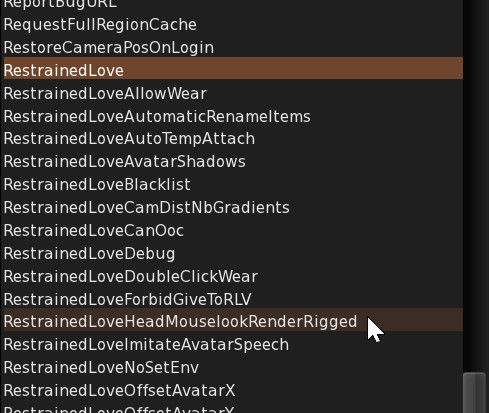
Then click on the drop down list to choose the debug setting you want to change, all the RLV debug settings begin with "RestrainedLove" (naturally, if you want to change another one like "AutomaticFly", naturally don't type "RestrainedLove" but "AutomaticFly" in the white field) :


Once you click on the debug setting you want to change, select one of the options to change its value. For example, here "RestrainedLoveHeadMouselookRenderRigged" is a boolean (i.e. either FALSE or TRUE) so it has only two options, FALSE and TRUE.


Once you modify the value, it generally takes effect immediately unless written otherwise in the description.


Useful debug settings

Below is a list of debug settings I like to change to values that work best for me. You may or may not want to use the same values, but just for your information here is the list. Except RevokePermsOnStopAnimation. You want that one FALSE.

AutomaticFly : FALSE
CameraFocalLength : 10.0
CloseChatOnReturn : TRUE (so you don't have to manually focus out of the chat bar)
DisableCameraConstraints : TRUE
EnvironmentPersistAcrossLogin : TRUE
InventoryLinking : TRUE (to show the "Paste As Link" menu item in the inventory)
InventoryOutboxMakeVisible : TRUE (only useful for merchants)
RenderShadowBias : -0.001
RenderShadowBlurSize : 0.0 (so you can have sharp shadows and AO at the same time)
RenderSpotShadowBias : 0.0
RenderSpotShadowOffset : 0.010 (so the shadows are not cropped)
RenderSSAOEffect : x=0.7 (makes the AO shadows more pronounced)
RenderSSAOFactor : 1.0 (same)
RenderVolumeLODFactor : 4.0 (the default 1.125 is way too low)
RevokePermsOnStopAnimation : FALSE (VERY important (*))
AvatarRotateThresholdSlow : 5 (much better than the default 60°)
ShowMyComplexityChanges : 0 (because I don't care about ARC)
NavBarShowCoordinates : TRUE

(*) This one is super important if you ask me. It is TRUE by default and when you manually stop your animations, it also revokes all the animation permissions you've given to scripts, in particular furniture, which breaks them because they still think they have your permission to animate you when you use them. Some can only be fixed by resetting them, but those that are no-mod are irremediably broken and must be replaced, if at all possible. So you want to set "RevokePermsOnStopAnimation" to FALSE to avoid this. I write it in bold to emphasize how important it is.


Enhancements

World shortcuts

* Left-Click on yourself while focusing on something (i.e. not in mouse-steering mode) does nothing if the "RestrainedLoveBreakFocusOnClick" debug setting is set to FALSE (it is TRUE by default so you'll have to change manually it for that). This allows you to avoid ruining a shot by accidentally clicking on something you didn't mean to.

* Shift+Left-Click on yourself to go back to mouse-steering mode, even if you click on one of your attachments, even if it's a HUD. This works only if the "RestrainedLoveBreakFocusOnClick" debug setting is set to FALSE (it is TRUE by default so you'll have to change it at some point).

* Alt+Right-Click on an object to sit on it directly. This is useful when you don't want to pull the context menu and/or when you want to sit in a running vehicle without stopping it dead in its tracks.

* Ctrl+Right-Click on an object or an attachment to edit it.

* Shift+Right-Click on an object (not an attachment) to open it.

* Shift+Right-Click on an attachment (not an in-world object) to detach it (if not RLV-locked).

* Ctrl+Alt+M (or AltGr+M) to go in and out of Mouselook mode.

* Ctrl+Alt+Shift+A to reset all the animations. This is a local action to synchronize all the animations on your side (useful for photos and/or when you are with a partner), nobody else sees any change.

* Ctrl+Alt+Shift+V to refresh all the objects around you. This is equivalent to right-clicking on all the objects in the vicinity one after the other, and is useful if something seems off, a prim did not update its state, or something like that.

* Ctrl+T : Hide and show the IM window. I say "IM window" because you can tear the chat panel off it and have one panel for all the IMs and another just for the chat, like in V1.

* Hold Shift while in Mouselook for a more precise aim.

* Hold Alt while in Mouselook to allow for clicking on in-world objects even if your controls are grabbed (for example by a gun, which defaults left click to "fire").

* Ctrl+Alt+R to force a rebake of your appearance, which also sanitizes your Current Outfit Folder, for example removing doubloons. This is also done automatically after any change in what you wear.

* Shortcuts like "Request admin status" (which yields a "Request for special powers failed. This request has been logged." response, which can be chilling) and other LL-only actions have been removed.


Edit shortcuts

These shortcuts are useful when editing an object.

* Alt+W to switch "Edit Linked" on and off.

* Alt+S to switch to the "Move" mode.

* Alt+X to switch to the "Select Face" mode.

* Alt+C to switch to the "Align" mode.

* Alt+T to switch "Stretch Textures" on and off.

* Alt+B to switch "Stretch Both Sides" on and off.

* Alt+R to set the ruler mode to "World" or "Attachment".

* Alt+F to set the ruler mode to "Local".

* Alt+V to set the ruler mode to "Reference".

* Alt+G to set the current selected object as the Reference and to set the ruler mode to "Reference".

You can find all those shortcuts in the Build / Options menu :


Other enhancements

* Invisible surfaces are not rendered unless "highlight invisible" is active (that's Ctrl+Alt+T). This speeds the rendering up a little especially if you or people around you are wearing a lot of invisible attachments.

* Rigged attachments worn on any head attachment point are not rendered in Mouselook if the "RestrainedLoveHeadMouselookRenderRigged" debug setting is set to FALSE (which is its default value).

* The UI is visible while in Mouselook and you can hold the Alt key to use your cursor across different UI elements like the inventory window.

* RLV floaters (courtesy of Chorazin Allen of Kokua). You open them from different items in the RLV menu, they are meant to let you control your current RLV restrictions and states much more easily and with a much finer grain.

* When someone around you types something in the chat (not an emote), you see "Typing" above their name if their name is visible.


Viewer-to-RLV IM commands

If you are IMing someone who is using this RLV, you can send commands to them through IM, even if you are not a RLV user yourself. Those commands are :

* @version to get the version of the RLV they are using.

* @getblacklist to get the list of blacklisted commands in their RLV (note : nowadays the RLV is hardcore, meaning it has no blacklist, no OOC exception and no mean to turn RLV features off so this command will yield nothing).

* @list to get the list of restrictions the other party is currently under.

* @stopim to remotely close the IM session (useful if they are under a @startim restriction).

Those commands can be entered by hand or by clicking on any of the four menu items in this menu :


If an automatic response is sent by the other party's RLV, they won't see anything, only you will. If they don't use the RLV, they will see the command like any other IM (and will probably ask you what that means).


Problems & Solutions

I don't see how to uninstall the RLV

In fact, the RLV does not install itself, the "RestrainedLoveSetup.exe" file might be an executable, but it is actually a self-extracting archive (in other words, a zip file that extracts itself). To remove it from your hard drive, simply delete the folder you've "installed" the RLV to.

Speaking of which, when you download a new RLV, it is always a good idea to completely delete the old one before "installing" the new one so there is no conflict.
The RLV saves its cache in C:\Users\(YourName)\AppData\Local\RLV .


My textures are constantly getting blurry and downloading

This is a common problem, usually called "texture thrashing". To solve it, the best way is to set the value of "Texture Memory" to 1552 in the graphics preferences.

Open the preferences with Ctrl+P, go to "Graphics", click on "Advanced Settings..." and drag the Texture Memory slider until it reaches 1552. No more, no less.


Why 1552 and no other number ? The explanation can be found here.


I want to see materials but my computer is not fast enough to render shadows

Simple. Open the Preferences, go to "Graphics", click on "Advanced Settings..." (see above). First, make sure "Advanced Lighting Model" ("ALM") is on so you can see materials, and switch the "Shadows" drop down list to "None".


The viewer is so slow it is unusable

If you find the viewer crawl down like a snail although your computer is good (or even passable, or even low end, you should still be able to experience some kind of smoothness), it might be because you are trying to use Voice without the appropriate extensions installed.

Although the official SL viewer ships with Voice installed, third party viewers do not have the right to include the corresponding extensions because they are proprietary.

You have two options. Either turn off Voice completely in the Preferences ("Sound & Media" panel), like this :


Or install the Voice extension from the official SL viewer that you must download.

The files are :

- SLVoice.exe
- vivoxsdk_x64.dll
- ortp_x64.dll

Copy them from the folder where you installed the SL viewer, into the folder where you installed the RLV, and relog.


Ok, the viewer is usable but still a bit slow

Make sure "Vertex Buffer Objects" and "Avatar Hardware Skinning" are activated in the advanced graphics preferences.


I see green people (or blue or yellow or pink etc)

In the graphics preferences, set "Avatar Maximum Complexity" to "No Limit" or at least activate "Always Render Friends". If you're afraid it will slow down your viewer, fret not. "ARC" (Avatar Rendering Cost, which is checked against "avatar maximum complexity") is merely an indication of the complexity of the visual rendering of an avatar, including their attachments. It is not because their ARC is high that they slow your viewer down, especially knowing that ARC includes invisible surfaces (in fact, it includes them four times) that the RLV does not render in the first place.


I want certain folders in my #RLV to never be detached by a script

Simply add "nostrip" at the end of the name of the folder or the item (if you can modify it) that you don't want detached. It can still be detached by hand, but a script won't be able to detach it anymore until you rename it and remove the "nostrip" tag.


F.A.Q.

What's the difference between RLV and RLVa ?

RLV and RLVa are two different implementations of the same specification (a.k.a. the "RLV API" that you find here) and are supposed to react the same way to the same commands sent by scripts.

In practice, there are some differences but they are minimal. RLVa (the "a" stands for "alternate") is primarily used in the Catznip viewer, then when mature enough in the Firestorm viewer as well as Singularity. It is maintained by Kitty Barnett, not by me so I can't provide support for it.


What other viewers use the RLV code ?

The ones I know of are :

* Kokua (formely Imprudence, maintained by Chorazin Allen, previously by Nicky Perian) : A Firestorm-like interface with the same enhancements, but with my RLV code instead of RLVa (so it handles the vision restriction commands of the RLV 2.9 spec, which RLVa and therefore Firestorm -- at the time of this writing -- cannot).

* Cool VL (formerly Cool Viewer, maintained by Henri Beauchamp) : A SLv1-like interface with many enhancements, and my RLV code.


There are others but I can't remember off the top of my head.


Have fun !
Marine

Thursday, February 21, 2019

RLV 2.9.26

Hi there,

This week I was in a "fix the damn annoying bugs already" kind of mood. So that's exactly what I did with the RLV, in particular with the rendering part of the vision restriction features.

Because I couldn't stand this anymore :

Your silhouette is painting over my body !

Nor this :

What's the deal with my transparent curtains and shadows turning opaque and very shiny when my vision is restricted ??


So I looked into it and after some significant changes (because those annoyances above were not actually bugs, but side-effects of the way I used to render the vision spheres and all the features that came with them, in particular how to prevent alpha surfaces from poking through said spheres), now I'm happy to say those two quirks are fixed !

See for yourself :

Now your silhouette stops doing weird things to my body.

And the curtains look like curtains even when my vision is restricted (which is why it is black outside).


So those two changes above are some of the "annoying bugs" that needed fixin'.

There's also a nice side-effect to this change, which you notice when you press Ctrl Alt T to highlight transparent surfaces in red. Before this version, you had to press Ctrl Alt Shift V to force a complete visual refresh of all the objects around you to make sure all the transparent surfaces were highlighted. This was due to when the faces were registered. Now, you no longer have to do that because the change is immediate.


But that's not all.

How many times did you ruin a perfect shot by clicking on your own avatar, making it turn its back to the camera while you meant to click on one of your attachments instead ?

And how many times did you try to steer your avatar with your mouse but had a hard time finding a good spot to click on (especially when your name tag is hidden) because you are wearing so much unrigged stuff ?

Now there is a new debug setting named "RestrainedLoveBreakFocusOnClick" (I didn't find anything longer and more difficult to remember sorry) that is TRUE by default to keep in line with the usual behavior, but if you turn it to FALSE, two things happen :

- Clicking on your avatar no longer switches back to mouse-steering mode unless you press Shift.
- Clicking on your avatar or any of your attachments while Shift is down switches back to mouse-steering mode, regardless of whether the attachment has a touch response or not, and it works through HUDs too (which is great if you're wearing a HUD that takes a lot of space on your screen, like a blindfold, a RemVision screen or whatever).

To change the value of "RestrainedLoveBreakFocusOnClick", simply open the Advanced menu (press Ctrl Alt D if you don't see it), go to "Debug Settings", paste "RestrainedLoveBreakFocusOnClick" in the white field then click on "FALSE", and that's it. I'll add a preference for it later if I can because it is a bit buried right now.


Speaking of debug setting, you might have noticed that when "Show Debug Messages" was active in the RLV menu, getting a lot of RLV commands at the same time would slow your viewer down to a crawl until the flow of commands stops. This was due to the viewer sending a lot of debug traces in the console at the same time.

Now, with the new "RestrainedLoveLogging" debug setting, the debug traces are only sent to the console when it is set to TRUE (it is FALSE by default), so no more slowdown when "Show Debug Messages" is active. This is actually Chorazin Allen's work on Kokua, all I did was take his changes and integrate them into the RLV itself. Thanks Chorazin !

Finally, there was a bug that made the viewer crash when receiving a @getstatusall and being under a ton of RLV restrictions. It took some time to fix and test, but I'm confident it won't be a problem anymore now.

No need to paste the changelist here, it basically repeats all that I have explained above.


You can grab the Windows version here :
http://www.erestraints.com/realrestraint/


The MD5 hash for the Windows executable is :
fc7528c436fa981a025c58ce198df1a5


Have fun !
Marine


PS : If you experience trouble with disappearing HUDs (for example the Lelutka minimized button) or parts of HUDs, please download again. I have ninja-updated the RLV 2.9.26 twice since its release without increasing the version number because I had to urgently remove a little optimization right before going to bed, then worked a little more and re-added it (with an additional check) the morning after. And I didn't want to increase the version or send a group notice twice while doing it. Sorry for the inconvenience.
For information, the MD5 hash of the initial version (with the bug) was 0350b5f406ff48f154f475ea9532d59b and the one of the second version (without the optimization) was 8262fc9c5e23ebc8642796150fa9a314.

Thursday, February 14, 2019

RLV 2.9.25.4

Hi,

Here is the latest version of the RLV with a few bug fixes and an improvements that will hopefully help you as much as it helps me.

Here is the list of changes :

- changed : When minimized, the icon of the viewer will no longer flash when someone is just typing in IM, it will still flash when receiving the actual message.

- changed : Force a rebake (and an Current Outfit Folder check) after TPing. This should help with the "lost attachments" bug that occurs sometimes, where what is in the COF and what you wear is not in sync, causing trouble when you relog.

- fixed : The viewer was slowing down when receiving a lot of RLV commands at the same time. It was due to Kokua's RLV floaters refreshing themselves even when hidden, thank you Chorazin Allen for looking into it and fixing it.

- fixed : Alpha-blended rigged attachments are no longer rendered beyond the vision restriction spheres at all, and this time it does not distinguish between materials, non-materials, fullbright, shiny and all that stuff.

- fixed : Set MAX_ATTACHMENT_REQUEST_LIFETIME back to 30 s. I had changed it to 3600 s (one hour) to make sure attachments requests would not time out on relog, but it did more harm than good.


As you can see, I'm hoping that the "objects getting detached after a TP" bug will go away, and after two days of TPing all over the place with nearly all my attachments slots taken, I can say that I didn't get any such bug, even after a few relogs. Of course, this bug being random means you can never be 100% sure it is fixed for good, so we'll see in the long run.

There's also the alpha-blended rigged surfaces rendering over the vision restriction spheres. This was due to the optimization in RLV 2.9.25. I've optimized a little more and fixed that pesky bug.

Oh and about the icon flashing, if that changes annoys too many people, I will add a debug setting in a future version. For now, this is just a convenience change because why flash the icon when somebody is just typing (or stopped typing), especially when there is no open IM session with this person, right ? It annoys be when someone is typing a long-winded request in IM (like, it literally takes 10 minutes to type) while I'm working on something else, because my icon is flashing the whole time and I can't get anything done since I am distracted by this. This change is meant to fix this.


You can grab the Windows version here :
http://www.erestraints.com/realrestraint/


The MD5 hash for the Windows executable is :
b6d5fe4d0ad7410d9bfa02a40ae584f9


Have fun,


Marine