Hello again,
Well as promised, the latest version for the RealRestraint products is available ! I won't repeat what the changes are here, the previous post explains it all. But it is a major update, with lots of changes !
Have fun,
Marine
Saturday, January 23, 2010
Thursday, January 21, 2010
RR version 1.20 coming soon !
Hello there,
This is just a small post to keep you updated with what I am doing at the moment. I have been working on my restraints, refactoring code, merging scripts and adding features, all in the name of improving user-friendliness and script load, which results in the soon-to-come version 1.20 of the Lockable system !
So what's in there ? Here is a glance, but remember that I am still working on it so there is no ETA yet, and I cannot guarantee that this list will not change (but it's pretty much stable now).
1. Lockable goes Mono. Not a big deal ? Well it was a necessary step in order to do all the rest, and the 1.17 and earlier versions are in LSL. This means less memory available so I squeezed the existing code as much as I could, hence more scripts to do complex tasks, hence more memory footprint for the sim. And guess what ? Linden Lab is going to set script limits on objects and attachments (memory and/or sim usage) at some point in 2010. So although I have delayed switching to Mono as much as I could, because of that infamous "freeze the whole sim when rezzing a Mono scripted object" bug, it is now time for me to take the step as well. You'll see, the features that this switch allows are worth it by far.
2a. The "Long time", "Gender" and "Alarm" plugins are now merged back into the main script (Lockable), allowing for 3 less plugins on the Plugins Browser. Their menus can be found on the new "Tools", "Special" and "Timer" pages of Lockable.

2b. The Lockable_Check_RL, NoDetach and Lockable_Shortcut scripts are now merged into Lockable too, allowing for 3 less scripts in the restraint again (so 6 less scripts in total, making it much easier on the sim).
3. More information on the Lockable menus : which page we are on, which pose the captive is locked in, whether the timers are hidden or shown, whether the captive is Blocked/Mouselooked.


4. More options for timers, coming from the former "Long time" plugin, including a "+10 mn"option for more precise control.

5. The ability to save the current state of the restraint (only when unlocked), specifically best time, best escape time, gender, visibility of timers etc. What's best is that even the older versions of Lockable will have their data saved for later, during the update ! So you won't lose your records by updating anymore.
6. Add support for 2 more locks, if a future restraint requires it. I have no plan to add more poses to existing restraints as of yet, but at least 1.20 will allow it if needed.
7. Favorites on the Plugins Browser. Now when you select the same plugin twice in a row from the Plugins Browser (not through "Last Plug"), it will be added to the list of favorites that shows on every page. Since there are at most 3 favorites, there are now only 6 plugins shown on each page, but it is an acceptable tradeoff since 3 plugins have disappeared now anyway. Oh and favorites are separated for the wearer who has no key to their restraint, from everyone else. Exactly like the "Last Plug" button on the Lockable main menu.

8. Ability to set Lockable to "silent" or "verbose". When "silent", everything Lockable says will be said in IM instead of chat, including keys, locks etc. This does not apply to plugins directly, but they are notified of the change.
9. When recovering tries, the message is said to the wearer only. This was seen as "green spam" by people, and didn't really make sense since the struggling was private anyway.
10. RealRestraint_Base will not Block the captive by default in any pose now. This was too confusing for the user, and didn't make it easy to resize the restraint, especially on the Shibari Ropes.
11. When clicking on Autoref and sitting, now the pose will be stopped. That way the captive won't have to unsit and sit again to keep the original pose of the furniture running.
12. Keep running in No-Script areas (main item, secondary items, HUD). It was not done before for simple memory usage reasons, but since Lockable has switched to Mono, this is not a problem anymore.
13. The delay for the main menu goes from 1 minute to 5 minutes.
14. Various bugfixes and oversights :
- "Cmd:L0" to "Cmd:L9" link messages are now supported (again) when received from scripts. They were removed for memory reasons, years ago, and never put back.
- No "Take Keys" link message was sent from Lockable when the wearer locks themselves and the keyholder is someone else.
- The Give Keys plugin does not try to reopen the menu anymore after giving the keys to someone else (it resulted in an "unauthorized access" message anyway).
- The Spy plugin was showing "your keyholder is online/offline" repeatedly when using a third party plugin that triggered dataserver events.
- The Spy plugin crashed. Badly. Repeatedly. And for no reason. And I still don't know why, but switching it to Mono should do the trick. I'll keep an eye on this bug though.
- The Leash plugin's "Anchor" feature was not working when avatar A anchored B to C, despite the prerelease tests. In fact I had tested it, observed it working, then changed a small thing in the script. And didn't retest. Bzzt. Same player shoot again.
15. When locking a captive, the higher the pose in the menu (from 1 to 6 for now), the stronger the restraint becomes, and more difficult to struggle out from.
Whew ! That's about it. And don't worry, the menus you are used to are mostly unchanged. I have done my best to keep the buttons at the same place, keeping them predictable, and the workflow stays the same. You won't have to re-learn everything, far from it. The biggest change you'll see is that "Block" and "Mouselook" are now in the "Special..." menu, instead of the "More..." menu, and that there are more menus, obviously. And less clicks to do the usual tasks like setting and hiding timers or choosing your favorite plugin, which is a plus. And all the scripts that have been merged still send their Link Messages the same way as before, so third party plugins won't see the difference.
Have fun !
Marine
Edit : Added point 15, and the Lockable menu actually expires after 5 minutes, not 3
This is just a small post to keep you updated with what I am doing at the moment. I have been working on my restraints, refactoring code, merging scripts and adding features, all in the name of improving user-friendliness and script load, which results in the soon-to-come version 1.20 of the Lockable system !
So what's in there ? Here is a glance, but remember that I am still working on it so there is no ETA yet, and I cannot guarantee that this list will not change (but it's pretty much stable now).
1. Lockable goes Mono. Not a big deal ? Well it was a necessary step in order to do all the rest, and the 1.17 and earlier versions are in LSL. This means less memory available so I squeezed the existing code as much as I could, hence more scripts to do complex tasks, hence more memory footprint for the sim. And guess what ? Linden Lab is going to set script limits on objects and attachments (memory and/or sim usage) at some point in 2010. So although I have delayed switching to Mono as much as I could, because of that infamous "freeze the whole sim when rezzing a Mono scripted object" bug, it is now time for me to take the step as well. You'll see, the features that this switch allows are worth it by far.
2a. The "Long time", "Gender" and "Alarm" plugins are now merged back into the main script (Lockable), allowing for 3 less plugins on the Plugins Browser. Their menus can be found on the new "Tools", "Special" and "Timer" pages of Lockable.

2b. The Lockable_Check_RL, NoDetach and Lockable_Shortcut scripts are now merged into Lockable too, allowing for 3 less scripts in the restraint again (so 6 less scripts in total, making it much easier on the sim).
3. More information on the Lockable menus : which page we are on, which pose the captive is locked in, whether the timers are hidden or shown, whether the captive is Blocked/Mouselooked.


4. More options for timers, coming from the former "Long time" plugin, including a "+10 mn"option for more precise control.

5. The ability to save the current state of the restraint (only when unlocked), specifically best time, best escape time, gender, visibility of timers etc. What's best is that even the older versions of Lockable will have their data saved for later, during the update ! So you won't lose your records by updating anymore.
6. Add support for 2 more locks, if a future restraint requires it. I have no plan to add more poses to existing restraints as of yet, but at least 1.20 will allow it if needed.
7. Favorites on the Plugins Browser. Now when you select the same plugin twice in a row from the Plugins Browser (not through "Last Plug"), it will be added to the list of favorites that shows on every page. Since there are at most 3 favorites, there are now only 6 plugins shown on each page, but it is an acceptable tradeoff since 3 plugins have disappeared now anyway. Oh and favorites are separated for the wearer who has no key to their restraint, from everyone else. Exactly like the "Last Plug" button on the Lockable main menu.

8. Ability to set Lockable to "silent" or "verbose". When "silent", everything Lockable says will be said in IM instead of chat, including keys, locks etc. This does not apply to plugins directly, but they are notified of the change.
9. When recovering tries, the message is said to the wearer only. This was seen as "green spam" by people, and didn't really make sense since the struggling was private anyway.
10. RealRestraint_Base will not Block the captive by default in any pose now. This was too confusing for the user, and didn't make it easy to resize the restraint, especially on the Shibari Ropes.
11. When clicking on Autoref and sitting, now the pose will be stopped. That way the captive won't have to unsit and sit again to keep the original pose of the furniture running.
12. Keep running in No-Script areas (main item, secondary items, HUD). It was not done before for simple memory usage reasons, but since Lockable has switched to Mono, this is not a problem anymore.
13. The delay for the main menu goes from 1 minute to 5 minutes.
14. Various bugfixes and oversights :
- "Cmd:L0" to "Cmd:L9" link messages are now supported (again) when received from scripts. They were removed for memory reasons, years ago, and never put back.
- No "Take Keys" link message was sent from Lockable when the wearer locks themselves and the keyholder is someone else.
- The Give Keys plugin does not try to reopen the menu anymore after giving the keys to someone else (it resulted in an "unauthorized access" message anyway).
- The Spy plugin was showing "your keyholder is online/offline" repeatedly when using a third party plugin that triggered dataserver events.
- The Spy plugin crashed. Badly. Repeatedly. And for no reason. And I still don't know why, but switching it to Mono should do the trick. I'll keep an eye on this bug though.
- The Leash plugin's "Anchor" feature was not working when avatar A anchored B to C, despite the prerelease tests. In fact I had tested it, observed it working, then changed a small thing in the script. And didn't retest. Bzzt. Same player shoot again.
15. When locking a captive, the higher the pose in the menu (from 1 to 6 for now), the stronger the restraint becomes, and more difficult to struggle out from.
Whew ! That's about it. And don't worry, the menus you are used to are mostly unchanged. I have done my best to keep the buttons at the same place, keeping them predictable, and the workflow stays the same. You won't have to re-learn everything, far from it. The biggest change you'll see is that "Block" and "Mouselook" are now in the "Special..." menu, instead of the "More..." menu, and that there are more menus, obviously. And less clicks to do the usual tasks like setting and hiding timers or choosing your favorite plugin, which is a plus. And all the scripts that have been merged still send their Link Messages the same way as before, so third party plugins won't see the difference.
Have fun !
Marine
Edit : Added point 15, and the Lockable menu actually expires after 5 minutes, not 3

Monday, December 7, 2009
RR Tutorial : Spy plugin
Hey,
Today we are going to talk about one of the most versatile and complex plugins of the whole RR suite : the Spy plugin. You can find it in the collars I sell, namely the Steel Collar of the Serious Shackles set, and the Elegance Collar of the Restrained Elegance set. It is best to keep it inside its collar, because the collar is fitted with a special LED that lights up when the Spy is active. Be warned, this tutorial is going to be very long and quite technical, for there is a lot to explain and demonstrate.
Now, why such a name ? Isn't it a bit edgy to make a plugin that spies on the captive ? Sometimes, the top wants to keep the captive under tight control, with her permission. This control implies to be kept informed about whatever the captive does, even if she's far away, or even when the top is offline. It does not, however, force the captive to do anything, except teleporting if she's using the RLV.
As it is a complex piece of work, I am going to demonstrate with Mary again. She will wear the collar, I will be her keyholder, and I will control her Spy plugin remotely. This is going to be fun, you'll see !
So first things first, I lock an Elegance Collar around Mary's neck. I click on it, go to Plugins > Spy, and I get this :
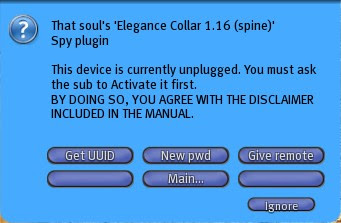
Oh wait, it says "This device is currently unplugged" and gives some reference to a disclaimer in the collar manual... hey I don't have the collar manual here ! And last time I tried to read it it was so big and thick and technical that I eventually gave up (let's be honest, that's why you're here reading this tutorial). It tells me to ask Mary to activate her plugin, problem is I have the key so she can't access it herself. Oh well.
I leave the key on her collar, ask her to click on it and to go to Plugins > Spy, and then to select "Activate". And finally to leave the key on because her key belongs to me, not to her. This whole "activation" process is simply a safety and a disclaimer to make both the top and the captive aware that this plugin is able to monitor who is around the captive, and also to listen to conversations and to send them to the top. It is the responsibility of both of them to use these features in a responsible manner.
Oh there are two little lights showing on the sides of her collar now ! They were not there before.
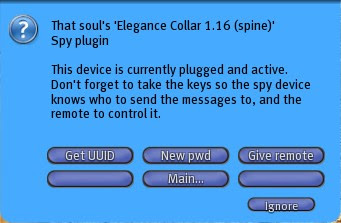
Ok so now the plugin is fully operational and I can control it. But... how ? All I see on the menu is "Get UUID", "New pwd" and "Give remote". Not many possibilities for control here... Actually I'm not going to use this menu much, if at all. I just need it as a starting point in order to retrieve the device that will really give me control. The plugin itself is just a gateway, a firewall that will receive, filter and execute orders coming from a remote. That's why I will not bother with "Get UUID" (but I'll explain what this button is for later) or "New pwd" (which is practically useless unless the password is compromised). I click on "Give remote".
Immediately I am given a device and also some kind of cryptic message like :
/191625/b8e81399-1e83-1d0d-5dc7-c8e7532f1ba8/208720
I'm told to copy/paste this message once I am wearing the remote, and this is exactly what I'll do. The remote tells me that it has acknowledged the code, so everything should be in order.
Let me explain you what this message means, exactly. Let's call it the "connection string", because it is what links my remote to Mary's collar. Technically, the remote sends emails to the collar, which sends IMs to me. That's it. The collar never ever talks to the remote, it doesn't even "know" it exists. It only talks to me. What is very important to keep in mind is that IMs are buffered by SL while I'm offline, and they can even be redirected to my mailbox (you can do that in your Preferences window, in the Communication tab). It is a very handy tool SL provides and this plugin relies on it.
But the remote has to "know" about the collar, and that requires to know its UUID (its unique identifier, it is "b8e81399-1e83-1d0d-5dc7-c8e7532f1ba8" for the sake of this example) and its "password" (which is only a numeric code in order to not accept commands from just anyone but the keyholder, "464928" here). Problem is, the UUID changes everytime the collar rezzes, namely when it is worn (not an issue if it is locked and the RLV is used) and when the captive logs in. In other words, everytime Mary logs in I have to reconnect my remote if I want to send commands the collar. If it is not connected, the collar will just keep doing whatever it has been programmed to do. Send position reports every X meters, relay chat etc.
But we're not there yet, let's try a few things first. As I am wearing my remote and it is supposedly connected, first thing I will do is to check it actually is. I click on my remote and... oh look a wall of buttons !
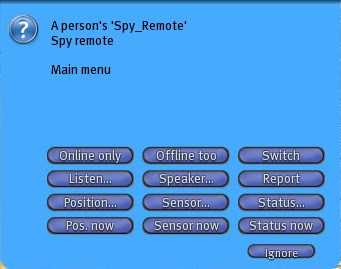
The "Report" button is what I need. I press it and here is what the collar tells me after a couple seconds :
Internal report for Mary X :
Position : OFF (30 m)
Sensor : OFF (30 m)
Status : OFF
Listen : OFF
Online only : NO
Time : 10:3:20
Time left : 0:0:0
Ok that's a lot of data. What does that mean exactly ?
The collar is fitted with a few very handy technological devices. A satellite locator, a teleporter, a scanner, an biological monitor, a mic, a speaker and it is even linked to the internal timers of the restraint. No less ! Every one of these devices can be turned on and off individually, and for the moment they are all switched off. There is also a general switch that inhibits everything with the press of a button, and reactivates only the formerly activated devices when pressed again.
And after this very long introduction, I am going to demonstrate the use of each one of these devices in turn. You'll see that when used well, the top can control the captive very effectively !
First off I want to know where Mary is at any time. Or at least when I want. I click on "Pos. now" and immediately I am given Mary's location, in the form of a slurl. You know what a slurl is, right ? It is like a web address, but it leads to a 3D location in the SL grid. If I click on it in my chat history my world map opens and I see where she is. I could teleport there so Mary can see me appear in front of her at any time if I choose to ! But it is rude to do so if she's not alone. Remember, the captive is the one monitored, her friends should never suffer from an excess of control from her top ! Be responsible !
Oh the little lights on her collar are flashing red ! This means that I have just sent a command to it. So whenever Mary sees her lights flashing, she knows I am thinking of her :)
I also want to know who is around her right now. I press "Sensor now" and I get this :
Sensor report for Mary X : Marine Kelley (2 m)
Well, duh. And once again the lights flash and then switch off again.
And what is she doing exactly right now ? I press "Status now" and I get :
Status report for Mary X : Away: NO Busy: NO Flying: NO Mouselook: NO Sitting: NO
She's not doing much... Granted this one report is rarely very useful but sometimes it helps.
But what I really want to know is what she does when I'm offline, when it is more difficult for me to request that kind of information. With her agreement, of course !
To do that, I just dig deeper into the "Position...", "Sensor..." and "Status..." submenus. No need to go into details there, but I will show you with the first one. The other two work exactly the same way.
I click on my remote and press "Position...". I am shown this submenu :
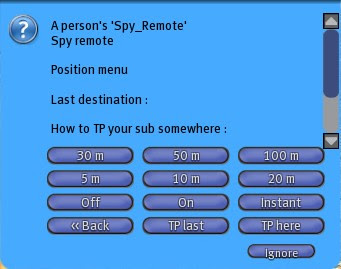
The "Instant" button will do exacly the same thing as the "Pos. now" one I pressed earlier, it will give me Mary's current location. However I am not interested in knowing where she is now, I know it already. I want to be notified everytime she walks or flies over 50 meters and when she teleports. To do this I just press "50 m" and then "On" to activate the satellite locator. I get the first position report immediately, and will get one more every time she moves 50 meters from where her collar sent its last report. I could be more precise and set it to 5 meters but that would only mean more reports, I don't want to be spammed.
Oh, now the lights on her collar are not flashing red, they are switched on and stay bright constantly... This means I am actively monitoring her, the lights won't turn off until I shut all the monitoring devices. Which I am not going to do yet. Hehe.
I do the same with the scanner, I go back to the main menu then press "Sensor..." :
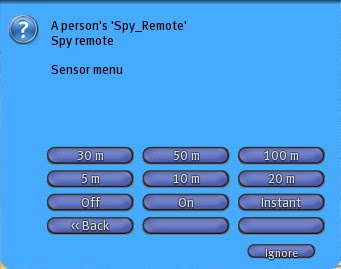
Once again, distances, "On", "Off" and "Instant". The meaning is exactly the same except that the distances mean the range of the scanner. Contrary to the locator, the shorter the distance the fewer the reports. I turn it on by pressing "On" and set its range to 20 meters by pressing "20 m". I also get an immediate sensor report. I will get one more everytime something changes in her surroundings (people change position or she moves). The scanner only reports people, it does not report objects (it is not a sonar).
Ok now she is all set, let's review what I've just changed. I go back to the main menu and press "Report" again :
Internal report for Mary X :
Position : ON (50 m)
Sensor : ON (50 m)
Status : OFF
Listen : OFF
Online only : NO
Time : 10:5:40
Time left : 0:0:0
The locator and the scanner are active, the lights are bright red meaning that at least one device is active, everything is nominal.
How about she goes "on the field" so I can test the real power of the collar and the remote ? Let's say I don't want her to know where I am sending her to, provided she is using the RLV (and she is, for the sake of this tutorial). Let's assume her Control plugin is set to not let her know her location. I want to send her to some place out there. For example the Kelley Park in Zhora. There are several solutions to do that. the soft way is to order her to tp there. But she won't because she's a brat and never does what she's told. The hard way is to make her. And that's exactly what I'm going to do.
I open my world map and type "Zhora" and validate. SL shows me the map of the Zhora sim in which I recognize the park, and I want to teleport Mary to its entrance. I click with my mouse on the black road in front of it, then "Copy slurl to clipboard" (that's one very handy button trust me). What it does is translate the point I have selected (the red dot on the map) into a slurl so that I can type it in chat.
I paste this slurl on channel 7 by typing "/7 " and Ctrl-V (or Apple-V) :
/7 http://slurl.com/secondlife/Zhora/185/128/25
And... voila ! Mary is teleported to that spot immediately. Note that it is always channel 7, it cannot be changed yet. Maybe in the future.
I also get a new position report since her locator is active :
Position report for Mary X : Parcel 'Zhora Downtown' at http://slurl.com/secondlife/Zhora/185/128/25
Clear, precise, no way to get mistaken. She is where I want her. And if I want to join her I just press Ctrl-H (not Apple-H) to get my chat history and click on the slurl I've just been given.
Oh and note that it would have worked even if she was leashed by her collar (not by any other restraint though). This is because a force-teleport overrides a no-teleport when it is sent by the same object, in this case her collar. She couldn't have gone back by her own means though, but I could have summoned her back myself through the remote. I will do that now. I click on my remote, go to "Position..." and press "TP here". And tadaa ! She's back, feeling a little like a ragdoll tossed around. That's a good way to show who's in control. She knows that I'll know wherever she is at any time, that I can send her where I want and that I can summon her back on a whim.
Ok enough tossing my captive around, let's go to the mic and the speaker now. The mic is fairly straightforward, and also the most controversial feature in this plugin. It simply allows to overhear whatever is said around the captive. I click on my remote, go to "Listen..." and press "All". This means I can now hear what she says and what people say around her, even when I'm not there. As it is an active device, the light stays bright red while I'm listening, so people have a clue the collar is active. They just don't know what exactly is being monitored.
Now, before you scream, just keep one thing in mind : the captive somewhat "belongs" to the top, and may be required to report whatever she heard at a later time anyway. There is exactly no way to prevent someone from pasting a chatlog or from telling someone else "so-and-so said this and that". If you don't want to be overheard by someone wearing a collar or any other device while you speak, just stick to IMs. Public chat is just that, public. You have the right to report whatever I say on the chat to whomever you like, but you do not have the right to use it against me. You just have to remember that chatlogs are not worth their weight in bytes anyway, since they can easily be modified. Last but not least, the disclaimer the captive has to agree to makes her and her top responsible of the use of the gathered info. Res-pon-sible.
Back on topic. The mic has only one purpose, like all the other devices : to keep the top up-to-date with whatever the captive does. I have been monitored by my top for months, and I must say it felt good to know that I always had this watchful eye over my shoulder. Never did she use it against anybody (I didn't go out much at that time anyway). Does it sound weird ? Not so much actually. It's hard to explain, certainly this feature is not for everyone. It can also be useful inside harems or prisons, where IMs are forbidden and the only mean of communication is plain chat. It helps wardens to stay in control.
The mic will repeat whatever is said around the captive to the top, but only if the latter is over 20 meters away from the person who speaks, to avoid hearing things twice. So if I stay near Mary I will not be repeated what I say, but if I move away and I shout, then the collar will transmit my own words. Let's try :
Marine Kelley: Echo ?
... Nothing.
I move about 30 meters away from Mary and I shout.
Marine Kelley shouts: Echoo ?!
Mary X hears : [Marine Kelley : Echoo ?!]
Neat !
Now of course, if I hear people talk I might want to respond. Well to make the collar respond. It just so happens that the collar has a built-in speaker, too. All I have to do is to turn on the mic of my remote and to start talking. I click on my remote, go to "Speaker..." and press "On". It tells me that the channel is 6, which means that everything I'll say on channel 6 will be transmitted to the collar and broadcast 20 meters around it ! So I better watch out and not say silly things. Of course the listener will not repeat what I just said (maybe it should ? I have to think about it for later).
I talked about the UUID of the collar and how it changed everytime it rezzed. This is a standard SL feature, and the direct consequence is that when Mary logs on, I cannot send commands to her collar through my remote until I "reconnect" it. That's why I am given a new "connection string" everytime she logs on, if I hold the key to her collar and it is activated. All I have to do is paste it like I did the first time. But if I forgot to do it, or for some reason I missed it (maybe I was in Busy mode), I can retrieve it by clicking on her collar, going to Plugins > Spy and to press "Get UUID". That's what this button is for !
Ok, last thing. Let's get real techy now. I'll explain what a command really is and I'll show you how to control a captive even when you're offline ! It's not hard, you'll see.
You already know that the remote sends emails to the collar, and that the collar sends IMs to the top. The remote is just a small email client with buttons to send commands easily, that's all. You absolutely don't need it in fact. It's just there to facilitate your life but a good email client (yes Yahoo and Gmail qualify) can replace your remote quite easily and safely.
Firstly let's analyze the connection string, which is what makes me able to send emails to the collar. As a reminder, the connection string is this message :
/191625/b8e81399-1e83-1d0d-5dc7-c8e7532f1ba8/208720
It is divided in three parts :
- The channel 191625, which is the command channel of the remote. If I'm not using a remote, I don't need to bother keeping that number in mind.
- The UUID, this strange 36-character-long alphanumeric string. This is the unique ID of the collar, and is part of its email address. I repeat, this thing changes everytime the collar rezzes. The full email address of the collar right now is b8e81399-1e83-1d0d-5dc7-c8e7532f1ba8@lsl.secondlife.com. Which means that if I send an email to this address, the collar will receive it, analyze it and possibly execute it !
- The password, "208720", because the collar must not execute everyone's commands, only mine. It will be the subject of the email. That's right, the subject is just a number, the body of the message is the actual command.
The commands are all explained in the manual of the collar so I will not demonstrate them all, but let's try a few here. Suppose I'm still online and near Mary, within chat range at least. I now switch to my Gmail webpage, from which I will send an email to the collar directly. Let's recap : I need the UUID, which is now b8e81399-1e83-1d0d-5dc7-c8e7532f1ba8 and the password, which is now 208720(and it won't change until the plugin is reset or it is changed manually with the "New pwd" button).
I prepare the following email :
To : b8e81399-1e83-1d0d-5dc7-c8e7532f1ba8@lsl.secondlife.com
Subject : 208720
Message : speaker Hello this is Marine !
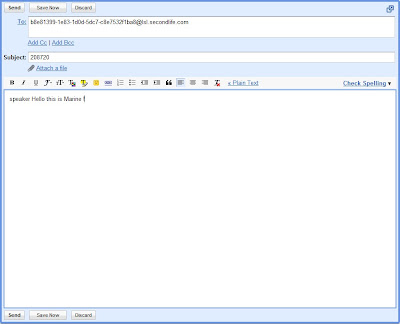
That's all. I press Send on the webpage, and what happens ? Mary's collar says the message I have just written after "speaker" (which is the keyword the collar recognizes as "say the following on channel 0").
One very important thing to say : my personal email address, the one I use with my Gmail account, is never disclosed. The collar does know who sent the message but it does absolutely nothing with that information, it quickly forgets it. So my address is not compromised. It makes no difference whether I send the message from Yahoo, Gmail, Hotmail or even the remote in SL, what matters is the command and the password, that's it.
I log off.
Mary logs off too, but she relogs not long after. I'll play the "offline top" for a moment here. Mary's collar sends me its connection string, which I receive in my mailbox since it is an IM and I'm offline. It is now the following :
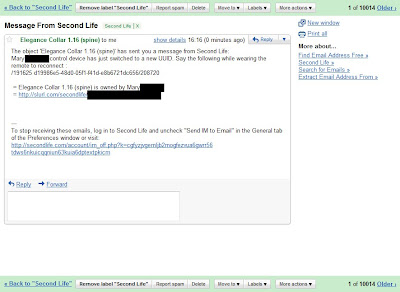
Notice that the channel and password didn't change, but the UUID did. I need this new info in order to command the collar from my mail client (e.g. at work). First of all I want a report, so I write this email :
To : d19986e5-48d0-05f1-f41d-e8b6721dc656@lsl.secondlife.com
Subject : 208720
Message : report
Easy huh ? Minutes later I get a report in my mailbox. It takes a little time because SL buffers incoming emails and outgoing IMs, there is nothing that can be done to make this system faster.
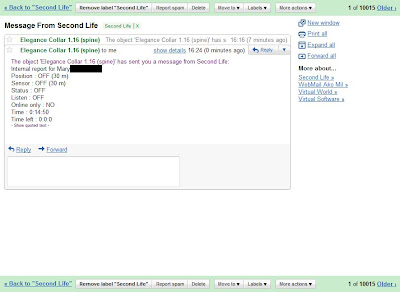
I want to know where she is right now. Another command to the collar :
To : d19986e5-48d0-05f1-f41d-e8b6721dc656@lsl.secondlife.com
Subject : 208720
Message : position instant
Once again, minutes later I receive a position report.
You may wonder how to manage several captives at the same time with one remote. Truth is... it is not really made for that yet. I am planning to add a proxy to be rezzed in-world, which would get all the UUID changes and provide aliases to the top so they don't have to reconnect everytime. The downside of this is that the proxy would have to be kept somewhere so the top has to own land. But it's not done yet, it's just in the plans.
Whoa. That was a long one, told you it was a complex plugin !
Hope you'll have fun with it, control freaks ! *g*
Marine
Today we are going to talk about one of the most versatile and complex plugins of the whole RR suite : the Spy plugin. You can find it in the collars I sell, namely the Steel Collar of the Serious Shackles set, and the Elegance Collar of the Restrained Elegance set. It is best to keep it inside its collar, because the collar is fitted with a special LED that lights up when the Spy is active. Be warned, this tutorial is going to be very long and quite technical, for there is a lot to explain and demonstrate.
Now, why such a name ? Isn't it a bit edgy to make a plugin that spies on the captive ? Sometimes, the top wants to keep the captive under tight control, with her permission. This control implies to be kept informed about whatever the captive does, even if she's far away, or even when the top is offline. It does not, however, force the captive to do anything, except teleporting if she's using the RLV.
As it is a complex piece of work, I am going to demonstrate with Mary again. She will wear the collar, I will be her keyholder, and I will control her Spy plugin remotely. This is going to be fun, you'll see !
So first things first, I lock an Elegance Collar around Mary's neck. I click on it, go to Plugins > Spy, and I get this :

Oh wait, it says "This device is currently unplugged" and gives some reference to a disclaimer in the collar manual... hey I don't have the collar manual here ! And last time I tried to read it it was so big and thick and technical that I eventually gave up (let's be honest, that's why you're here reading this tutorial). It tells me to ask Mary to activate her plugin, problem is I have the key so she can't access it herself. Oh well.
I leave the key on her collar, ask her to click on it and to go to Plugins > Spy, and then to select "Activate". And finally to leave the key on because her key belongs to me, not to her. This whole "activation" process is simply a safety and a disclaimer to make both the top and the captive aware that this plugin is able to monitor who is around the captive, and also to listen to conversations and to send them to the top. It is the responsibility of both of them to use these features in a responsible manner.
Oh there are two little lights showing on the sides of her collar now ! They were not there before.

Ok so now the plugin is fully operational and I can control it. But... how ? All I see on the menu is "Get UUID", "New pwd" and "Give remote". Not many possibilities for control here... Actually I'm not going to use this menu much, if at all. I just need it as a starting point in order to retrieve the device that will really give me control. The plugin itself is just a gateway, a firewall that will receive, filter and execute orders coming from a remote. That's why I will not bother with "Get UUID" (but I'll explain what this button is for later) or "New pwd" (which is practically useless unless the password is compromised). I click on "Give remote".
Immediately I am given a device and also some kind of cryptic message like :
/191625/b8e81399-1e83-1d0d-5dc7-c8e7532f1ba8/208720
I'm told to copy/paste this message once I am wearing the remote, and this is exactly what I'll do. The remote tells me that it has acknowledged the code, so everything should be in order.
Let me explain you what this message means, exactly. Let's call it the "connection string", because it is what links my remote to Mary's collar. Technically, the remote sends emails to the collar, which sends IMs to me. That's it. The collar never ever talks to the remote, it doesn't even "know" it exists. It only talks to me. What is very important to keep in mind is that IMs are buffered by SL while I'm offline, and they can even be redirected to my mailbox (you can do that in your Preferences window, in the Communication tab). It is a very handy tool SL provides and this plugin relies on it.
But the remote has to "know" about the collar, and that requires to know its UUID (its unique identifier, it is "b8e81399-1e83-1d0d-5dc7-c8e7532f1ba8" for the sake of this example) and its "password" (which is only a numeric code in order to not accept commands from just anyone but the keyholder, "464928" here). Problem is, the UUID changes everytime the collar rezzes, namely when it is worn (not an issue if it is locked and the RLV is used) and when the captive logs in. In other words, everytime Mary logs in I have to reconnect my remote if I want to send commands the collar. If it is not connected, the collar will just keep doing whatever it has been programmed to do. Send position reports every X meters, relay chat etc.
But we're not there yet, let's try a few things first. As I am wearing my remote and it is supposedly connected, first thing I will do is to check it actually is. I click on my remote and... oh look a wall of buttons !

The "Report" button is what I need. I press it and here is what the collar tells me after a couple seconds :
Internal report for Mary X :
Position : OFF (30 m)
Sensor : OFF (30 m)
Status : OFF
Listen : OFF
Online only : NO
Time : 10:3:20
Time left : 0:0:0
Ok that's a lot of data. What does that mean exactly ?
The collar is fitted with a few very handy technological devices. A satellite locator, a teleporter, a scanner, an biological monitor, a mic, a speaker and it is even linked to the internal timers of the restraint. No less ! Every one of these devices can be turned on and off individually, and for the moment they are all switched off. There is also a general switch that inhibits everything with the press of a button, and reactivates only the formerly activated devices when pressed again.
And after this very long introduction, I am going to demonstrate the use of each one of these devices in turn. You'll see that when used well, the top can control the captive very effectively !
First off I want to know where Mary is at any time. Or at least when I want. I click on "Pos. now" and immediately I am given Mary's location, in the form of a slurl. You know what a slurl is, right ? It is like a web address, but it leads to a 3D location in the SL grid. If I click on it in my chat history my world map opens and I see where she is. I could teleport there so Mary can see me appear in front of her at any time if I choose to ! But it is rude to do so if she's not alone. Remember, the captive is the one monitored, her friends should never suffer from an excess of control from her top ! Be responsible !
Oh the little lights on her collar are flashing red ! This means that I have just sent a command to it. So whenever Mary sees her lights flashing, she knows I am thinking of her :)
I also want to know who is around her right now. I press "Sensor now" and I get this :
Sensor report for Mary X : Marine Kelley (2 m)
Well, duh. And once again the lights flash and then switch off again.
And what is she doing exactly right now ? I press "Status now" and I get :
Status report for Mary X : Away: NO Busy: NO Flying: NO Mouselook: NO Sitting: NO
She's not doing much... Granted this one report is rarely very useful but sometimes it helps.
But what I really want to know is what she does when I'm offline, when it is more difficult for me to request that kind of information. With her agreement, of course !
To do that, I just dig deeper into the "Position...", "Sensor..." and "Status..." submenus. No need to go into details there, but I will show you with the first one. The other two work exactly the same way.
I click on my remote and press "Position...". I am shown this submenu :

The "Instant" button will do exacly the same thing as the "Pos. now" one I pressed earlier, it will give me Mary's current location. However I am not interested in knowing where she is now, I know it already. I want to be notified everytime she walks or flies over 50 meters and when she teleports. To do this I just press "50 m" and then "On" to activate the satellite locator. I get the first position report immediately, and will get one more every time she moves 50 meters from where her collar sent its last report. I could be more precise and set it to 5 meters but that would only mean more reports, I don't want to be spammed.
Oh, now the lights on her collar are not flashing red, they are switched on and stay bright constantly... This means I am actively monitoring her, the lights won't turn off until I shut all the monitoring devices. Which I am not going to do yet. Hehe.
I do the same with the scanner, I go back to the main menu then press "Sensor..." :

Once again, distances, "On", "Off" and "Instant". The meaning is exactly the same except that the distances mean the range of the scanner. Contrary to the locator, the shorter the distance the fewer the reports. I turn it on by pressing "On" and set its range to 20 meters by pressing "20 m". I also get an immediate sensor report. I will get one more everytime something changes in her surroundings (people change position or she moves). The scanner only reports people, it does not report objects (it is not a sonar).
Ok now she is all set, let's review what I've just changed. I go back to the main menu and press "Report" again :
Internal report for Mary X :
Position : ON (50 m)
Sensor : ON (50 m)
Status : OFF
Listen : OFF
Online only : NO
Time : 10:5:40
Time left : 0:0:0
The locator and the scanner are active, the lights are bright red meaning that at least one device is active, everything is nominal.
How about she goes "on the field" so I can test the real power of the collar and the remote ? Let's say I don't want her to know where I am sending her to, provided she is using the RLV (and she is, for the sake of this tutorial). Let's assume her Control plugin is set to not let her know her location. I want to send her to some place out there. For example the Kelley Park in Zhora. There are several solutions to do that. the soft way is to order her to tp there. But she won't because she's a brat and never does what she's told. The hard way is to make her. And that's exactly what I'm going to do.
I open my world map and type "Zhora" and validate. SL shows me the map of the Zhora sim in which I recognize the park, and I want to teleport Mary to its entrance. I click with my mouse on the black road in front of it, then "Copy slurl to clipboard" (that's one very handy button trust me). What it does is translate the point I have selected (the red dot on the map) into a slurl so that I can type it in chat.
I paste this slurl on channel 7 by typing "/7 " and Ctrl-V (or Apple-V) :
/7 http://slurl.com/secondlife/Zhora/185/128/25
And... voila ! Mary is teleported to that spot immediately. Note that it is always channel 7, it cannot be changed yet. Maybe in the future.
I also get a new position report since her locator is active :
Position report for Mary X : Parcel 'Zhora Downtown' at http://slurl.com/secondlife/Zhora/185/128/25
Clear, precise, no way to get mistaken. She is where I want her. And if I want to join her I just press Ctrl-H (not Apple-H) to get my chat history and click on the slurl I've just been given.
Oh and note that it would have worked even if she was leashed by her collar (not by any other restraint though). This is because a force-teleport overrides a no-teleport when it is sent by the same object, in this case her collar. She couldn't have gone back by her own means though, but I could have summoned her back myself through the remote. I will do that now. I click on my remote, go to "Position..." and press "TP here". And tadaa ! She's back, feeling a little like a ragdoll tossed around. That's a good way to show who's in control. She knows that I'll know wherever she is at any time, that I can send her where I want and that I can summon her back on a whim.
Ok enough tossing my captive around, let's go to the mic and the speaker now. The mic is fairly straightforward, and also the most controversial feature in this plugin. It simply allows to overhear whatever is said around the captive. I click on my remote, go to "Listen..." and press "All". This means I can now hear what she says and what people say around her, even when I'm not there. As it is an active device, the light stays bright red while I'm listening, so people have a clue the collar is active. They just don't know what exactly is being monitored.
Now, before you scream, just keep one thing in mind : the captive somewhat "belongs" to the top, and may be required to report whatever she heard at a later time anyway. There is exactly no way to prevent someone from pasting a chatlog or from telling someone else "so-and-so said this and that". If you don't want to be overheard by someone wearing a collar or any other device while you speak, just stick to IMs. Public chat is just that, public. You have the right to report whatever I say on the chat to whomever you like, but you do not have the right to use it against me. You just have to remember that chatlogs are not worth their weight in bytes anyway, since they can easily be modified. Last but not least, the disclaimer the captive has to agree to makes her and her top responsible of the use of the gathered info. Res-pon-sible.
Back on topic. The mic has only one purpose, like all the other devices : to keep the top up-to-date with whatever the captive does. I have been monitored by my top for months, and I must say it felt good to know that I always had this watchful eye over my shoulder. Never did she use it against anybody (I didn't go out much at that time anyway). Does it sound weird ? Not so much actually. It's hard to explain, certainly this feature is not for everyone. It can also be useful inside harems or prisons, where IMs are forbidden and the only mean of communication is plain chat. It helps wardens to stay in control.
The mic will repeat whatever is said around the captive to the top, but only if the latter is over 20 meters away from the person who speaks, to avoid hearing things twice. So if I stay near Mary I will not be repeated what I say, but if I move away and I shout, then the collar will transmit my own words. Let's try :
Marine Kelley: Echo ?
... Nothing.
I move about 30 meters away from Mary and I shout.
Marine Kelley shouts: Echoo ?!
Mary X hears : [Marine Kelley : Echoo ?!]
Neat !
Now of course, if I hear people talk I might want to respond. Well to make the collar respond. It just so happens that the collar has a built-in speaker, too. All I have to do is to turn on the mic of my remote and to start talking. I click on my remote, go to "Speaker..." and press "On". It tells me that the channel is 6, which means that everything I'll say on channel 6 will be transmitted to the collar and broadcast 20 meters around it ! So I better watch out and not say silly things. Of course the listener will not repeat what I just said (maybe it should ? I have to think about it for later).
I talked about the UUID of the collar and how it changed everytime it rezzed. This is a standard SL feature, and the direct consequence is that when Mary logs on, I cannot send commands to her collar through my remote until I "reconnect" it. That's why I am given a new "connection string" everytime she logs on, if I hold the key to her collar and it is activated. All I have to do is paste it like I did the first time. But if I forgot to do it, or for some reason I missed it (maybe I was in Busy mode), I can retrieve it by clicking on her collar, going to Plugins > Spy and to press "Get UUID". That's what this button is for !
Ok, last thing. Let's get real techy now. I'll explain what a command really is and I'll show you how to control a captive even when you're offline ! It's not hard, you'll see.
You already know that the remote sends emails to the collar, and that the collar sends IMs to the top. The remote is just a small email client with buttons to send commands easily, that's all. You absolutely don't need it in fact. It's just there to facilitate your life but a good email client (yes Yahoo and Gmail qualify) can replace your remote quite easily and safely.
Firstly let's analyze the connection string, which is what makes me able to send emails to the collar. As a reminder, the connection string is this message :
/191625/b8e81399-1e83-1d0d-5dc7-c8e7532f1ba8/208720
It is divided in three parts :
- The channel 191625, which is the command channel of the remote. If I'm not using a remote, I don't need to bother keeping that number in mind.
- The UUID, this strange 36-character-long alphanumeric string. This is the unique ID of the collar, and is part of its email address. I repeat, this thing changes everytime the collar rezzes. The full email address of the collar right now is b8e81399-1e83-1d0d-5dc7-c8e7532f1ba8@lsl.secondlife.com. Which means that if I send an email to this address, the collar will receive it, analyze it and possibly execute it !
- The password, "208720", because the collar must not execute everyone's commands, only mine. It will be the subject of the email. That's right, the subject is just a number, the body of the message is the actual command.
The commands are all explained in the manual of the collar so I will not demonstrate them all, but let's try a few here. Suppose I'm still online and near Mary, within chat range at least. I now switch to my Gmail webpage, from which I will send an email to the collar directly. Let's recap : I need the UUID, which is now b8e81399-1e83-1d0d-5dc7-c8e7532f1ba8 and the password, which is now 208720(and it won't change until the plugin is reset or it is changed manually with the "New pwd" button).
I prepare the following email :
To : b8e81399-1e83-1d0d-5dc7-c8e7532f1ba8@lsl.secondlife.com
Subject : 208720
Message : speaker Hello this is Marine !

That's all. I press Send on the webpage, and what happens ? Mary's collar says the message I have just written after "speaker" (which is the keyword the collar recognizes as "say the following on channel 0").
One very important thing to say : my personal email address, the one I use with my Gmail account, is never disclosed. The collar does know who sent the message but it does absolutely nothing with that information, it quickly forgets it. So my address is not compromised. It makes no difference whether I send the message from Yahoo, Gmail, Hotmail or even the remote in SL, what matters is the command and the password, that's it.
I log off.
Mary logs off too, but she relogs not long after. I'll play the "offline top" for a moment here. Mary's collar sends me its connection string, which I receive in my mailbox since it is an IM and I'm offline. It is now the following :

Notice that the channel and password didn't change, but the UUID did. I need this new info in order to command the collar from my mail client (e.g. at work). First of all I want a report, so I write this email :
To : d19986e5-48d0-05f1-f41d-e8b6721dc656@lsl.secondlife.com
Subject : 208720
Message : report
Easy huh ? Minutes later I get a report in my mailbox. It takes a little time because SL buffers incoming emails and outgoing IMs, there is nothing that can be done to make this system faster.

I want to know where she is right now. Another command to the collar :
To : d19986e5-48d0-05f1-f41d-e8b6721dc656@lsl.secondlife.com
Subject : 208720
Message : position instant
Once again, minutes later I receive a position report.
You may wonder how to manage several captives at the same time with one remote. Truth is... it is not really made for that yet. I am planning to add a proxy to be rezzed in-world, which would get all the UUID changes and provide aliases to the top so they don't have to reconnect everytime. The downside of this is that the proxy would have to be kept somewhere so the top has to own land. But it's not done yet, it's just in the plans.
Whoa. That was a long one, told you it was a complex plugin !
Hope you'll have fun with it, control freaks ! *g*
Marine
Thursday, November 19, 2009
Such a beautiful day
And such a perfect one ! Sugar and I got partnered yesterday, both wearing white wedding dresses (you don't see that often outside SL !), and both terrified, but happy :)
Before you ask, our ceremony was quite simple and short. We didn't want to make anything huge or pompous or never-ending, we wanted to stay ourselves, and to stay true to each other.
It took place in Allure, Amethyst's private sim. This sim is not only beautiful, it is also where I used to spend my time when I was a noob, hidden. I held fond memories of this place, and now I'm going to hold even more !
 Dear Amethyst. You know her. We all do :)
Speaking of Ame, she has made us the honor of not only assisting to the ceremony, but actually taking it in charge ! She has prepared everything that we weren't handling ourselves. Everything was set, to the finest detail. That was so sweet of her !
We had to choose a time when not many of our friends were online. This was because of several RL schedule contraints, both for Sugar and for me, which ruled weekends out. Yesterday morning and noon (SL time) were when it was best for us, when we were less likely to be interrupted. And despite that awkward schedule, all those who could come, did. Some even rushed online just to avoid being late, and one was sick but managed to stay there as long as she could !
Thank you so much for being there and witnessing our union, Sabrina, Tess, Daisy, Jayleia, Jessica, Devious, Eve, Inara, Mija, Chorazin, RubberMan and Chyanne... And Gin and Valar for being at the reception after the ceremony... And all the others who would have liked to come but couldn't... Warm kisses !

Jay, Inara, Chorazin, Daisy

Jessica, Inara again
 Tess, Devious, Sabrina, Jessica again
So while people were arriving, a little before 10am SL time, Sugar and I were readying, "hidden" behind the hill, both shaking in anticipation, almost sure that something would go wrong. SL was acting up a little because of the rolling restarts going on at that time, stressing the asset servers a lot, paintaing my veil in grey and turning Sugar's flowers into blobs. But nothing we couldn't handle.

And then... Tadaa ! Here we come. Very slowly. Walking straight, side by side, looking forward, too scared to think, while Amethyst is standing up there waiting for us at the altar.
Once there, while we were totally not daring to look at the guests, Ame welcomed everyone and asked us a few questions. Then we went on to our vows, holding our hands, both almost crying.

And... a very,
very,
veeeery long kiss ^_^

After the ceremony, which lasted no more than one hour (we wouldn't want to bore our guests to death, would we ? And most of them were very thirsty near the end anyway *g), we all walked across the sim and headed to the reception room. Appreciating the beauty of the landscape on our way.
Once there, the guests settled around the pyramid of champagne glasses which were only waiting to be filled.
So the bottle of champagne was opened with a loud "pop", and I filled the glasses from above, slowly (risking a spectacular and stupid death in the process). A real fountain.

The rules in order to be granted a glass were simple : either kiss Sugar, or me, or both. For some reason we ended ex-aequo. Maybe we'll have to do it again *g*
We danced...
 Our slow
And danced...
 With Sabrina
And danced again...


 Two wild twirling white tornadoes
Till we were all worn out and only a cake would save us from total starvation !
 Hurry up, RubberMan is hungry !
And finally, when stuffed and back home alone, guess what... we crashed together !

It was all so perfect ! I will never forget that day :)
Marine
Before you ask, our ceremony was quite simple and short. We didn't want to make anything huge or pompous or never-ending, we wanted to stay ourselves, and to stay true to each other.
It took place in Allure, Amethyst's private sim. This sim is not only beautiful, it is also where I used to spend my time when I was a noob, hidden. I held fond memories of this place, and now I'm going to hold even more !
 Dear Amethyst. You know her. We all do :)
Speaking of Ame, she has made us the honor of not only assisting to the ceremony, but actually taking it in charge ! She has prepared everything that we weren't handling ourselves. Everything was set, to the finest detail. That was so sweet of her !
We had to choose a time when not many of our friends were online. This was because of several RL schedule contraints, both for Sugar and for me, which ruled weekends out. Yesterday morning and noon (SL time) were when it was best for us, when we were less likely to be interrupted. And despite that awkward schedule, all those who could come, did. Some even rushed online just to avoid being late, and one was sick but managed to stay there as long as she could !
Thank you so much for being there and witnessing our union, Sabrina, Tess, Daisy, Jayleia, Jessica, Devious, Eve, Inara, Mija, Chorazin, RubberMan and Chyanne... And Gin and Valar for being at the reception after the ceremony... And all the others who would have liked to come but couldn't... Warm kisses !
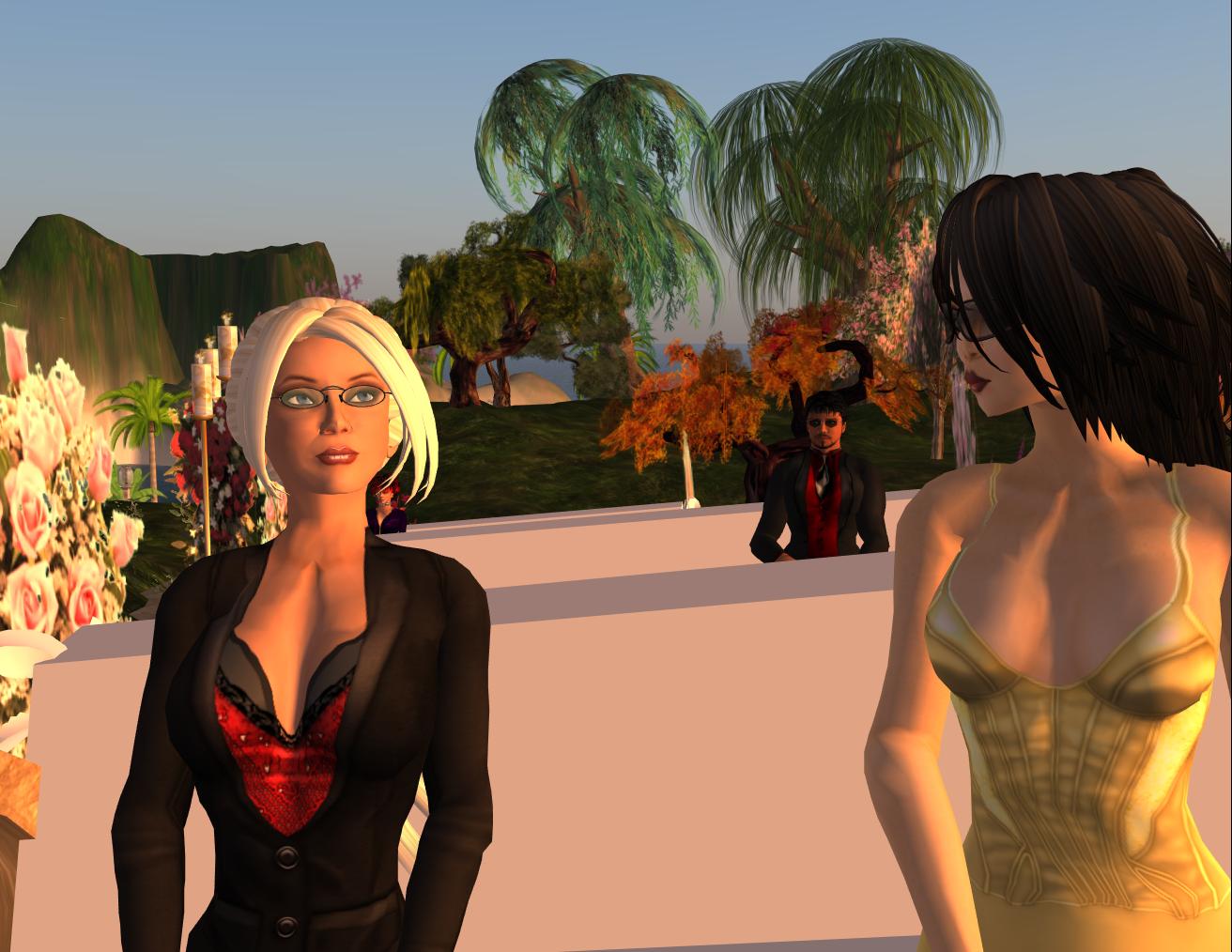
Jay, Inara, Chorazin, Daisy

Jessica, Inara again
 Tess, Devious, Sabrina, Jessica again
So while people were arriving, a little before 10am SL time, Sugar and I were readying, "hidden" behind the hill, both shaking in anticipation, almost sure that something would go wrong. SL was acting up a little because of the rolling restarts going on at that time, stressing the asset servers a lot, paintaing my veil in grey and turning Sugar's flowers into blobs. But nothing we couldn't handle.

And then... Tadaa ! Here we come. Very slowly. Walking straight, side by side, looking forward, too scared to think, while Amethyst is standing up there waiting for us at the altar.
Once there, while we were totally not daring to look at the guests, Ame welcomed everyone and asked us a few questions. Then we went on to our vows, holding our hands, both almost crying.

And... a very,
very,
veeeery long kiss ^_^

After the ceremony, which lasted no more than one hour (we wouldn't want to bore our guests to death, would we ? And most of them were very thirsty near the end anyway *g), we all walked across the sim and headed to the reception room. Appreciating the beauty of the landscape on our way.
Once there, the guests settled around the pyramid of champagne glasses which were only waiting to be filled.
So the bottle of champagne was opened with a loud "pop", and I filled the glasses from above, slowly (risking a spectacular and stupid death in the process). A real fountain.

The rules in order to be granted a glass were simple : either kiss Sugar, or me, or both. For some reason we ended ex-aequo. Maybe we'll have to do it again *g*
We danced...
 Our slow
And danced...
 With Sabrina
And danced again...


 Two wild twirling white tornadoes
Till we were all worn out and only a cake would save us from total starvation !
 Hurry up, RubberMan is hungry !
And finally, when stuffed and back home alone, guess what... we crashed together !

It was all so perfect ! I will never forget that day :)
Marine
Tuesday, November 17, 2009
Sugar & Spice
Hello there,
You may wonder why I've been so silent lately, well there you have it :
Oh I know, I know, "it's about freakin' time", I heard that a lot lately :) It's been three years after all !
Now, if you've read my blog since the beginning you might have an idea of who Ollalla Sugarbeet is. If you don't, well let me introduce her. Again.

Sugar (that's her nickname, she doesn't really like to be called "Ollalla") is a very sweet and cunning person, who has been living with me since we were noobs. She has helped me with every single project of mine, not technically but socially, to understand the long-term impacts of my decisions. I can say that almost all the good significant decisions I took were taken after discussing with her, while almost all the bad decisions were taken by me alone. On every project. RR, RLV, Banishment Program, Maze, SLBI Computers, SLBI Greylist, SLBI Trackers and so on and so forth. In a way, she is the element of rationality and stability in my crazy race for perfection.
This is because she has the eyes of the hawk. And she knows a lot of people, how they think, how they feel, chances are she even knows you ! All this knowledge allows her to anticipate whatever would happen if a change was implemented to whatever system, at the social level. In our couple (I almost said in our team) she is the social element while I am the technical one. Both equally important in regards to the projects we do together. And God knows we have accomplished a lot, together and separately.
She has also always been there when I was feeling down. Always ready to drop everything when she felt I needed to be cheered up, and she has, several times. Always ready for some action when things were looking blah. And always ready to turn the tables when able !
Our friends tell us that we are an exemplary couple in SL. Given how fast things change in this virtual world, 3 years almost feel like 30 ! And given how many temptations SL offers, how easy it is to stray from a promise, and how easy it is to finally get burnt out and quit, leaving the other party alone and sad, it is a wonder we went that far. Or is it ?
I think not. Sure we have changed. Grown up from noobish status to less-noobish status. Got our share of drama. Felt let down by people sometimes. Lost ourselves into careless fun with strangers (and we still do it and it is still as fun). Got little carried away when having fun together. But we never ever lost faith in each other, or grew bored of each other. After three years, it is still as refreshing to be together, so no, it is not a wonder at all that we went that far.
Oh of course, partnering in SL may mean as little as a name on a profile, or as much as an actual RL wedding. To me, it is a way to say "Thank you for being there and believing in me". And "I enjoy every minute I spend with you". And above everything else, "I always had and will always have your best interests at heart".
Because you're my priority in SL, Sugar. Now take my hand and let's keep walking, shall we ?
Marine
You may wonder why I've been so silent lately, well there you have it :
My friend Ollalla and I are getting partnered !
Oh I know, I know, "it's about freakin' time", I heard that a lot lately :) It's been three years after all !
Now, if you've read my blog since the beginning you might have an idea of who Ollalla Sugarbeet is. If you don't, well let me introduce her. Again.

Sugar (that's her nickname, she doesn't really like to be called "Ollalla") is a very sweet and cunning person, who has been living with me since we were noobs. She has helped me with every single project of mine, not technically but socially, to understand the long-term impacts of my decisions. I can say that almost all the good significant decisions I took were taken after discussing with her, while almost all the bad decisions were taken by me alone. On every project. RR, RLV, Banishment Program, Maze, SLBI Computers, SLBI Greylist, SLBI Trackers and so on and so forth. In a way, she is the element of rationality and stability in my crazy race for perfection.
This is because she has the eyes of the hawk. And she knows a lot of people, how they think, how they feel, chances are she even knows you ! All this knowledge allows her to anticipate whatever would happen if a change was implemented to whatever system, at the social level. In our couple (I almost said in our team) she is the social element while I am the technical one. Both equally important in regards to the projects we do together. And God knows we have accomplished a lot, together and separately.
She has also always been there when I was feeling down. Always ready to drop everything when she felt I needed to be cheered up, and she has, several times. Always ready for some action when things were looking blah. And always ready to turn the tables when able !
Our friends tell us that we are an exemplary couple in SL. Given how fast things change in this virtual world, 3 years almost feel like 30 ! And given how many temptations SL offers, how easy it is to stray from a promise, and how easy it is to finally get burnt out and quit, leaving the other party alone and sad, it is a wonder we went that far. Or is it ?
I think not. Sure we have changed. Grown up from noobish status to less-noobish status. Got our share of drama. Felt let down by people sometimes. Lost ourselves into careless fun with strangers (and we still do it and it is still as fun). Got little carried away when having fun together. But we never ever lost faith in each other, or grew bored of each other. After three years, it is still as refreshing to be together, so no, it is not a wonder at all that we went that far.
Oh of course, partnering in SL may mean as little as a name on a profile, or as much as an actual RL wedding. To me, it is a way to say "Thank you for being there and believing in me". And "I enjoy every minute I spend with you". And above everything else, "I always had and will always have your best interests at heart".
Because you're my priority in SL, Sugar. Now take my hand and let's keep walking, shall we ?
Marine
Sunday, October 18, 2009
RestrainedLife 1.22.1
Hi there,
As promised here is the latest version of the RLV, which is a minor update but interesting nonetheless :
- Updated the code to match the one of the SL viewer v1.23.5.
- And for RealRestraint fans who like to spend time bound, the ability to focus the camera on objects at all times, even when "blocked" (meaning a huge prim blocks their clicks, to make the restraint feel even more "real").
Download it here :
http://www.erestraint.com/realrestraint
MD5 hash for the Windows zip file :
2b5efeb94cce38cc56c7ce73325ab20d
Have fun !
Marine
PS : This is the 100th post on my blog. Yay !
PS 2 : I had to re-upload the zip file a few hours later, because I messed up with the version of the SL viewer, it showed 1.23.4 instead of 1.23.5. Fixed now, and the hash code has changed (new one is up there). The old hash code was e24da2cab06c2062dd88d1345615cfda
As promised here is the latest version of the RLV, which is a minor update but interesting nonetheless :
- Updated the code to match the one of the SL viewer v1.23.5.
- And for RealRestraint fans who like to spend time bound, the ability to focus the camera on objects at all times, even when "blocked" (meaning a huge prim blocks their clicks, to make the restraint feel even more "real").
Download it here :
http://www.erestraint.com/realrestraint
MD5 hash for the Windows zip file :
2b5efeb94cce38cc56c7ce73325ab20d
Have fun !
Marine
PS : This is the 100th post on my blog. Yay !
PS 2 : I had to re-upload the zip file a few hours later, because I messed up with the version of the SL viewer, it showed 1.23.4 instead of 1.23.5. Fixed now, and the hash code has changed (new one is up there). The old hash code was e24da2cab06c2062dd88d1345615cfda
Saturday, October 17, 2009
RestrainedLife 1.22.1 coming soon
Hi there,
Just a quick post to say that I have a working RLV 1.22.1 on my Mac, and that it will soon be released for Windows. This new version will include :
- Compiled from the latest SL 1.23.5 with its notecard changes.
- The ability to focus your camera through HUDs. This one is made for hardcore RealRestraint fans who like to spend their life bound and blocked, but who regret their camera can't focus on objects because of the blocking prim on their HUD (which is made to intercept touches). It also discards right-clicks while holding the Alt key, since it would allow you to sit or touch objects through a HUD. This change does not apply if you're in Mouselook view, though, it wouldn't make sense.
As this update is not really urgent, RLV 1.22 works with SL 1.23.5 already, and as Real Life is rather busy at the moment, please be patient while the compiler warms up. Thank you !
Have fun,
Marine
Just a quick post to say that I have a working RLV 1.22.1 on my Mac, and that it will soon be released for Windows. This new version will include :
- Compiled from the latest SL 1.23.5 with its notecard changes.
- The ability to focus your camera through HUDs. This one is made for hardcore RealRestraint fans who like to spend their life bound and blocked, but who regret their camera can't focus on objects because of the blocking prim on their HUD (which is made to intercept touches). It also discards right-clicks while holding the Alt key, since it would allow you to sit or touch objects through a HUD. This change does not apply if you're in Mouselook view, though, it wouldn't make sense.
As this update is not really urgent, RLV 1.22 works with SL 1.23.5 already, and as Real Life is rather busy at the moment, please be patient while the compiler warms up. Thank you !
Have fun,
Marine
Subscribe to:
Posts (Atom)

 Posts
Posts

