Hi !
Here is the latest version of the RLV, with a few new commands and a LOT of enhancements, to make your SL easier... See for yourself !
- added : @touchme=add exception to the @touch*=n restrictions, this works only for the oject that issues this restriction, to avoid cheating.
- added : @startim=n command, to prevent the user from opening an IM session with anybody (the little "trill" sound will still play, though).
- added : @startim:UUID=add exception to the above restriction.
- added : @startimto:UUID=n command, same as @startim, but regarding one particular person only.
- added : Debug setting RestrainedLoveShowEllipsis (default to TRUE) to show or hide the "..." when you are under @recvchat or @recvchatfrom.
- added : A new RLV menu with the following items :
- List RLV restrictions => displays a list of the current restrictions and exceptions in effect, in the chat history.
- Show Debug Info => Activate or deactivate debugging info for RLV commands.
- Forbid offers to #RLV => allow or forbid objects to send inventory directly in your #RLV folder.
- Double-click to Wear => To choose the default behaviour (Replace or Add) of the viewer when double-clicking on an inventory item to wear it.
- added : Some features from Firestorm :
- Login screen to default to secondlife.com instead of a dumb blank page.
- Temporary textures and snapshots uploads.
- No MOTD on the login progress screen (who wants advertisement anyway ?).
- Top status bar now contains an info button, the name of the parcel and the properties icons (no fly, no rez etc).
- MU*-style emotes (in other words, being able to begin your sentences with ":" as well as "/me").
- Names over "Show Look At" crosshairs.
- Distance on the minimap inspector.
- Radar on the People panel and chat history notifications (but no ability to teleport directly to someone, this is too intrusive).
- added : Some enhancements of my own :
- In-world profiles. Although inspired by Firestorm, these are closer to the v2 codebase.
- Friends offline/online notifications on the chat history (this is managed by the "OnlineOfflinetoNearbyChat" debug setting).
- Group count on the group panel, to show to how many groups you belong.
- Profile, Teleport, Share and Pay buttons directly on the IM window, to act as shortcuts.
- Keeping the permission icons in the friends list always visible.
- fixed : Replacing an outfit while the RLV was deactivated would not work (thank you Lance Corrimal).
- fixed : Avatar tooltip would not be correct when using Display Names, and under @shownames.
I hope all these improvements will make the viewer more enjoyable to use... They sure did for me :)
As usual, you can grab it there :
http://www.erestraint.com/realrestraint
And the MD5 hash for the Windows installer is
37659d3e5d77613103257fd4e71a1d97
Have fun !
Marine
Sunday, April 10, 2011
Monday, April 4, 2011
The next RLV will have a little Firestorm in it !
Hello there,
I long wanted to port a few features from Phoenix/Firestorm to the RLV but never had the time for it. These features are meant to improve the user-friendliness of the viewer, and I am glad they are now part of the original RLV. See for yourself :
- Temporary texture upload : This one is almost a copy/paste from Firestorm, and is very handy, it allows you to upload a texture without having to pay the upload fee, this texture being temporary and not surviving across sessions. It's a life-saver for the builder who wants to test textures without going broke, or for the snap-happy who wants to quickly show their pictures off.
- No advertisement on the startup page.
- Show the name of the parcel and region (with coordinates and properties as icons, plus a quick info button) on the top status bar, making the navigation bar less necessary, hence freeing a lot of real estate on the screen.
- In-world profiles, in lieu of the new web profiles (except for your own personal profile, which requires more controls to edit it). They are much faster and smaller, you can open several of them at the same time, you can drag/drop items on them, etc, etc. They are not a copy from Firestorm though, they are looking much more v2-like.
- Names over the "look at" crosshairs. I don't know how useful it is except for saying "stop staring at me !", but many people like them, so here they are.
- Added the current number of groups and the maximum number of groups to the groups panel (I don't know why it isn't there out of the box).
- Added the distance to the avatar on the minimap inspector.
- Added a menu item (under "Me") to list the current RLV restrictions in the chat history (this one was looong overdue).
- Added an automatic replacement of leading ":" by "/me", to please the MU* people (works in IMs too).
- Added some of the radar functions of Firestorm into the People tab : Payment info, Age in days, Number of seconds spent since detected, and more importantly, the Range ! I did not add the context menu and especially NOT the "Teleport to avatar" action, because I believe it breaks the privacy of said avatar. Nobody likes to see someone appear right in front of their nose without a warning. I banned some for that in the past.
- Added 4 buttons directly on the IM window : Profile, Teleport, Share and Pay, as shortcuts to the same buttons on the left sliding panel (the one that slides open when you click on ">>").
All these are small enhancements, but added to the enhancements the RLV already offers (right click shortcuts, sliders on the status bar etc), it makes the viewer much more user-friendly.
Please don't message me to ask me to add this and that feature though, my goal is not to copycat Firestorm (or any other viewer for that matter), but to add a few improvements that I feel LL should have added long ago.
There is no ETA yet, there is still a little work to do but everything I have listed here works already.
Have fun !
Marine
I long wanted to port a few features from Phoenix/Firestorm to the RLV but never had the time for it. These features are meant to improve the user-friendliness of the viewer, and I am glad they are now part of the original RLV. See for yourself :
- Temporary texture upload : This one is almost a copy/paste from Firestorm, and is very handy, it allows you to upload a texture without having to pay the upload fee, this texture being temporary and not surviving across sessions. It's a life-saver for the builder who wants to test textures without going broke, or for the snap-happy who wants to quickly show their pictures off.
- No advertisement on the startup page.
- Show the name of the parcel and region (with coordinates and properties as icons, plus a quick info button) on the top status bar, making the navigation bar less necessary, hence freeing a lot of real estate on the screen.
- In-world profiles, in lieu of the new web profiles (except for your own personal profile, which requires more controls to edit it). They are much faster and smaller, you can open several of them at the same time, you can drag/drop items on them, etc, etc. They are not a copy from Firestorm though, they are looking much more v2-like.
- Names over the "look at" crosshairs. I don't know how useful it is except for saying "stop staring at me !", but many people like them, so here they are.
- Added the current number of groups and the maximum number of groups to the groups panel (I don't know why it isn't there out of the box).
- Added the distance to the avatar on the minimap inspector.
- Added a menu item (under "Me") to list the current RLV restrictions in the chat history (this one was looong overdue).
- Added an automatic replacement of leading ":" by "/me", to please the MU* people (works in IMs too).
- Added some of the radar functions of Firestorm into the People tab : Payment info, Age in days, Number of seconds spent since detected, and more importantly, the Range ! I did not add the context menu and especially NOT the "Teleport to avatar" action, because I believe it breaks the privacy of said avatar. Nobody likes to see someone appear right in front of their nose without a warning. I banned some for that in the past.
- Added 4 buttons directly on the IM window : Profile, Teleport, Share and Pay, as shortcuts to the same buttons on the left sliding panel (the one that slides open when you click on ">>").
All these are small enhancements, but added to the enhancements the RLV already offers (right click shortcuts, sliders on the status bar etc), it makes the viewer much more user-friendly.
Please don't message me to ask me to add this and that feature though, my goal is not to copycat Firestorm (or any other viewer for that matter), but to add a few improvements that I feel LL should have added long ago.
There is no ETA yet, there is still a little work to do but everything I have listed here works already.
Have fun !
Marine

Sunday, March 27, 2011
Restrained Love v2.5.0.1
Hi there,
So it seems I have made a little oops with the RLV 2.5, by adding the Starlight skin I forgot to re-include two patches that would have been interesting. Plus the little fix I added to avoid making the avatar bounce when wearing clothes, actually introduced another annoying bug, that is fixed in this version (you could not remove a stacked piece of clothing easily, e.g. you couldn't remove the second shirt if you had a first one, without removing them all at the same time, how silly).
So here it is, go grab it at the usual spot :
http://www.erestraint.com/realrestraint
And the hash for the Windows version is
c3aea95f88a347a8a21fa1ebbbb2d125
Have fun and sorry for the oversights !
Marine
So it seems I have made a little oops with the RLV 2.5, by adding the Starlight skin I forgot to re-include two patches that would have been interesting. Plus the little fix I added to avoid making the avatar bounce when wearing clothes, actually introduced another annoying bug, that is fixed in this version (you could not remove a stacked piece of clothing easily, e.g. you couldn't remove the second shirt if you had a first one, without removing them all at the same time, how silly).
So here it is, go grab it at the usual spot :
http://www.erestraint.com/realrestraint
And the hash for the Windows version is
c3aea95f88a347a8a21fa1ebbbb2d125
Have fun and sorry for the oversights !
Marine
Saturday, March 26, 2011
Restrained Love v2.5
And as promised, here it is, the latest version of the RLV.
Those of you who read this blog regularly know that this version is a bit big, with more than a few new commands. If you're interested in knowing what is new, read on. If you prefer downloading it right away, just go grab it at the usual location :
http://www.erestraint.com/realrestraint
And the MD5 hash for the Windows executable is
b59d5b3e49c50ad3c0178d4b034cdf6c
Still here ? Let me paste the readme file for you then :
- added : Notification to scripts on clothes and attachment changes. This allows a script to be notified when the user wears or unwears an outfit, without having to constantly poll for the list of worn items. The notifications are "(worn/unworn/attached/detached) (legally/illegally) (path_to_outfit)"
- added : "@adjustheight" command, as implemented by Henri Beauchamp (see http://sldev.free.fr/forum/viewtopic.php?f=7&p=1847#p1847 for details).
- added : "@attachoverorreplace", "@attachthisoverorreplace", "@attachalloverorreplace" and "@attachallthisoverorreplace" commands, which now do what respectively "@attach", "@attachthis", "@attachall" and "@attachallthis" used to do until now, in preparation for a possible change in the future.
- added : "@setgroup:(name)=force" command to force the user to activate the specified group (they must be a member of course). "none" will deactivate the group tag.
- added : "@setgroup=n" to prevent the user from switching groups.
- added : "@getgroup=2222" to obtain the name of the current activated group of the user. Please note that the UUID of the group is not disclosed, only the name, to stay consistent with the LSL API.
- added : "@touchworld:(uuid)=add" exception to allow to touch an specific object in world even when "@touchworld=n" is active.
- added : "@touchthis:uuid=n" restriction to prevent from touching one object in particular.
- added : "@unsharedwear=n" command to prevent the user from wearing anything that is not under #RLV. (*)
- added : "@unsharedunwear=n" command to prevent the user from unwearing anything that is not under #RLV. (*)
- added : "@detachthis_except:(folder_child)=add" to add an exception to a "@detachallthis:(folder_parent)=n" restriction, provided that (folder_child) is contained somewhere under (folder_parent) and that "@detachthis_except" has been issued by the same object (this kind of exception does not work between different objects, on purpose). (*)
- added : "@detachallthis_except:(folder_child)=add", same thing as above but will include all the sub-folders in the exception as well. (*)
- added : "@attachthis_except:(folder_child)=add" to add an exception to a "@attachallthis:(folder_parent)=n" restriction, provided that (folder_child) is contained somewhere under (folder_parent) and that "@attachthis_except" has been issued by the same object (this kind of exception does not work between different objects, on purpose). (*)
- added : "@attachallthis_except:(folder_child)=add", same thing as above but will include all the sub-folders in the exception as well. (*)
- changed : Now "@attachall:=force" (notice the lack of option after the colon) is ignored, to avoid a common mistake that would make the user attach their whole #RLV folder (and given the time it takes, probably disconnect their viewer in the process).
- changed : The minimap is not hidden anymore when "@showloc=n" is issued.
- changed : The user can now wear up to 10 pieces of clothing per layer (for example, 10 jackets at the same time). Please note that the maximum number of objects per attachment point has NOT been increased, in order to avoid hogging the sim.
- changed : The avatar will not bounce up and down when wearing and removing clothes, having the nice side-effect of increasing the speed of changing outfits.
- fixed : Could remove the jacket layer even when contained into a shared folder and "@detachthis:jacket=n" was issued.
- fixed : Could change shape even under "@remoutfit:shape=n".
(*) : These new commands are extremely helpful when you want to lock everything except a particular folder (and its subfolders if you need). You can for example issue a "@attachallthis=n" command to lock the whole #RLV off, followed by a "@unsharedwear=n" command to make sure that no other folder can be worn instead (locking the inventory out would work well too but would be a bit overkill), then issue a "@attachallthis_except:boots=add" to allow the avatar to wear only what is contained inside the "#RLV/Boots" folder (if any) or any of its children.
Of course, while a folder is locked that way, the user is unable to rename it, move it, or move its contents. Moreso, since such an exception is valid only with restrictions issued by the same object, if another object issues a "@attachallthis=n" command, this will completely void the exceptions issued by the former object and lock the whole #RLV folder anyway.
Finally, the RLV checks the closest parent's restriction when it comes to determining whether an outfit can be worn or unworn. In other words, you can decide that a folder and all its children are locked off, except one sub-folder that can be worn, and a couple of its own children cannot.
You may have noticed that the commands "@attach" and "@attachoverorreplace" are synonyms now, as well as their derivatives. Although I wanted to revert "@attach" back to how it used to behave on RLV 1.x (i.e. always replacing existing attachments when attaching new ones), this had the nasty effect of upsetting a lot more people than I thought at first. I am not here to upset people, so this change is going to be postponed until further notice. I'll try to communicate early enough when it really needs to take place, but for now it is not a necessity yet.
Have fun !
Marine
Those of you who read this blog regularly know that this version is a bit big, with more than a few new commands. If you're interested in knowing what is new, read on. If you prefer downloading it right away, just go grab it at the usual location :
http://www.erestraint.com/realrestraint
And the MD5 hash for the Windows executable is
b59d5b3e49c50ad3c0178d4b034cdf6c
Still here ? Let me paste the readme file for you then :
- added : Notification to scripts on clothes and attachment changes. This allows a script to be notified when the user wears or unwears an outfit, without having to constantly poll for the list of worn items. The notifications are "(worn/unworn/attached/detached) (legally/illegally) (path_to_outfit)"
- added : "@adjustheight" command, as implemented by Henri Beauchamp (see http://sldev.free.fr/forum/viewtopic.php?f=7&p=1847#p1847 for details).
- added : "@attachoverorreplace", "@attachthisoverorreplace", "@attachalloverorreplace" and "@attachallthisoverorreplace" commands, which now do what respectively "@attach", "@attachthis", "@attachall" and "@attachallthis" used to do until now, in preparation for a possible change in the future.
- added : "@setgroup:(name)=force" command to force the user to activate the specified group (they must be a member of course). "none" will deactivate the group tag.
- added : "@setgroup=n" to prevent the user from switching groups.
- added : "@getgroup=2222" to obtain the name of the current activated group of the user. Please note that the UUID of the group is not disclosed, only the name, to stay consistent with the LSL API.
- added : "@touchworld:(uuid)=add" exception to allow to touch an specific object in world even when "@touchworld=n" is active.
- added : "@touchthis:uuid=n" restriction to prevent from touching one object in particular.
- added : "@unsharedwear=n" command to prevent the user from wearing anything that is not under #RLV. (*)
- added : "@unsharedunwear=n" command to prevent the user from unwearing anything that is not under #RLV. (*)
- added : "@detachthis_except:(folder_child)=add" to add an exception to a "@detachallthis:(folder_parent)=n" restriction, provided that (folder_child) is contained somewhere under (folder_parent) and that "@detachthis_except" has been issued by the same object (this kind of exception does not work between different objects, on purpose). (*)
- added : "@detachallthis_except:(folder_child)=add", same thing as above but will include all the sub-folders in the exception as well. (*)
- added : "@attachthis_except:(folder_child)=add" to add an exception to a "@attachallthis:(folder_parent)=n" restriction, provided that (folder_child) is contained somewhere under (folder_parent) and that "@attachthis_except" has been issued by the same object (this kind of exception does not work between different objects, on purpose). (*)
- added : "@attachallthis_except:(folder_child)=add", same thing as above but will include all the sub-folders in the exception as well. (*)
- changed : Now "@attachall:=force" (notice the lack of option after the colon) is ignored, to avoid a common mistake that would make the user attach their whole #RLV folder (and given the time it takes, probably disconnect their viewer in the process).
- changed : The minimap is not hidden anymore when "@showloc=n" is issued.
- changed : The user can now wear up to 10 pieces of clothing per layer (for example, 10 jackets at the same time). Please note that the maximum number of objects per attachment point has NOT been increased, in order to avoid hogging the sim.
- changed : The avatar will not bounce up and down when wearing and removing clothes, having the nice side-effect of increasing the speed of changing outfits.
- fixed : Could remove the jacket layer even when contained into a shared folder and "@detachthis:jacket=n" was issued.
- fixed : Could change shape even under "@remoutfit:shape=n".
(*) : These new commands are extremely helpful when you want to lock everything except a particular folder (and its subfolders if you need). You can for example issue a "@attachallthis=n" command to lock the whole #RLV off, followed by a "@unsharedwear=n" command to make sure that no other folder can be worn instead (locking the inventory out would work well too but would be a bit overkill), then issue a "@attachallthis_except:boots=add" to allow the avatar to wear only what is contained inside the "#RLV/Boots" folder (if any) or any of its children.
Of course, while a folder is locked that way, the user is unable to rename it, move it, or move its contents. Moreso, since such an exception is valid only with restrictions issued by the same object, if another object issues a "@attachallthis=n" command, this will completely void the exceptions issued by the former object and lock the whole #RLV folder anyway.
Finally, the RLV checks the closest parent's restriction when it comes to determining whether an outfit can be worn or unworn. In other words, you can decide that a folder and all its children are locked off, except one sub-folder that can be worn, and a couple of its own children cannot.
You may have noticed that the commands "@attach" and "@attachoverorreplace" are synonyms now, as well as their derivatives. Although I wanted to revert "@attach" back to how it used to behave on RLV 1.x (i.e. always replacing existing attachments when attaching new ones), this had the nasty effect of upsetting a lot more people than I thought at first. I am not here to upset people, so this change is going to be postponed until further notice. I'll try to communicate early enough when it really needs to take place, but for now it is not a necessity yet.
Have fun !
Marine
Restrained Love v2.5 coming soon, addendum
Hi again,
It seems the change I had planned on the @attach command actually put a lot of people in trouble. Or at least would if it were adopted, so I will postpone it until further notice.
So finally :
- The @attach command on RLV 1.x, will REPLACE the attachment that was present, by the one the command is attaching
- The @attach command on RLV 2.x (including 2.5) will REPLACE the present attachment, UNLESS the name of the folder to attach begins with a "+" (or whatever the user choses), in which case it would ADD it without detaching what was already there.
- The @attachover command stays in RLV 2.x and is not meant to go away.
- The @attachoverorreplace command will STILL be added (in case some of you already started to update your products), and will act EXACTLY like the current @attach command.
I'll be honest, this keeps an inconsistency that I hoped to get rid of. But not at the expense of the users and the scripters.
Sorry for the inconvenience,
Marine
PS : this blog post is likely to be followed closely by another one announcing the release of RLV 2.5, since I am finalizing it at the time of this writing.
It seems the change I had planned on the @attach command actually put a lot of people in trouble. Or at least would if it were adopted, so I will postpone it until further notice.
So finally :
- The @attach command on RLV 1.x, will REPLACE the attachment that was present, by the one the command is attaching
- The @attach command on RLV 2.x (including 2.5) will REPLACE the present attachment, UNLESS the name of the folder to attach begins with a "+" (or whatever the user choses), in which case it would ADD it without detaching what was already there.
- The @attachover command stays in RLV 2.x and is not meant to go away.
- The @attachoverorreplace command will STILL be added (in case some of you already started to update your products), and will act EXACTLY like the current @attach command.
I'll be honest, this keeps an inconsistency that I hoped to get rid of. But not at the expense of the users and the scripters.
Sorry for the inconvenience,
Marine
PS : this blog post is likely to be followed closely by another one announcing the release of RLV 2.5, since I am finalizing it at the time of this writing.
Wednesday, March 23, 2011
Restrained Love v2.5 coming soon
Hello there,
So after about a month of working non-stop on the Vixen Leather Training Set, here I am back on the RLV, which needed some attention.
First of all, it needed to be upgraded to the latest SL viewer codebase, just so you could benefit from the 40-groups-limit that was introduced in the SL viewer v2.5, and the RLV was lagging behind until now.
Secondly... well there are a lot of commands that I always wanted to add, and that are now going to be live soon. See for yourself :
- added : Notification to scripts on clothes and attachment changes. This allows a script to be notified when the user wears or unwears an outfit, without having to constantly poll for the list of worn items. The notifications are "(worn/unworn/attached/detached) (legally/illegally) (path_to_outfit)"
- added : "@adjustheight" command, as implemented by Henri Beauchamp (see http://sldev.free.fr/forum/viewtopic.php?f=7&p=1847#p1847 for details).
- added : "@attachoverorreplace", "@attachthisoverorreplace", "@attachalloverorreplace" and "@attachallthisoverorreplace" commands, which now do what respectively "@attach", "@attachthis", "@attachall" and "@attachallthis" used to do from v2.0 to v2.4.
- added : "@setgroup:(name)=force" command to force the user to activate the specified group (they must be a member of course). "none" will deactivate the group tag.
- added : "@setgroup=n" to prevent the user from switching groups.
- added : "@getgroup=2222" to obtain the name of the current activated group of the user. Please note that the UUID of the group is not disclosed, only the name, to stay consistent with the LSL API.
- added : "@touchworld:(uuid)=add" exception to allow to touch an specific object in world even when "@touchworld=n" is active.
- added : "@touchthis:uuid=n" restriction to prevent from touching one object in particular.
- added : "@unsharedwear=n" command to prevent the user from wearing anything that is not under #RLV. (*)
- added : "@unsharedunwear=n" command to prevent the user from unwearing anything that is not under #RLV. (*)
- added : "@detachthis_except:(folder_child)=add" to add an exception to a "@detachallthis:(folder_parent)=n" restriction, provided that (folder_child) is contained somewhere under (folder_parent) and that "@detachthis_except" has been issued by the same object (this kind of exception does not work between different objects, on purpose). (*)
- added : "@detachallthis_except:(folder_child)=add", same thing as above but will include all the sub-folders in the exception as well. (*)
- added : "@attachthis_except:(folder_child)=add" to add an exception to a "@attachallthis:(folder_parent)=n" restriction, provided that (folder_child) is contained somewhere under (folder_parent) and that "@attachthis_except" has been issued by the same object (this kind of exception does not work between different objects, on purpose). (*)
- added : "@attachallthis_except:(folder_child)=add", same thing as above but will include all the sub-folders in the exception as well. (*)
- changed : "@attach" now does not care about the "+" character in the beginning of a folder when attaching it anymore, this command will now always replace what was previously worn, exactly like it used to do in v1.x. The "@attachoverorreplace" command and its derivatives will do what "@attach" used to do from v2.0 to v2.4 included. This spares the script from having to "guess" whether an outfit would stack or replace when wearing it with "@attach".
- changed : Now "@attachall:=force" (notice the lack of option after the colon) is ignored, to avoid a common mistake that would make the user attach their whole #RLV folder (and given the time it takes, probably disconnect their viewer in the process).
- changed : The minimap is not hidden anymore when "@showloc=n" is issued.
- fixed : Could remove the jacket layer even when contained into a shared folder and "@detachthis:jacket=n" was issued.
(*) : These new commands are extremely helpful when you want to lock everything except a particular folder (and its subfolders if you need). You can for example issue a "@attachallthis=n" command to lock the whole #RLV off, followed by a "@unsharedwear=n" command to make sure that no other folder can be worn instead (locking the inventory out would work well too but would be a bit overkill), then issue a "@attachallthis_except:boots=add" to allow the avatar to wear only what is contained inside the "#RLV/Boots" folder (if any) or any of its children.
Of course, while a folder is locked that way, the user is unable to rename it, move it, or move its contents. Moreso, since such an exception is valid only with restrictions issued by the same object, if another object issues a "@attachallthis=n" command, this will completely void the exceptions issued by the former object and lock the whole #RLV folder anyway.
Finally, the RLV checks the closest parent's restriction when it comes to determining whether an outfit can be worn or unworn. In other words, you can decide that a folder and all its children are locked off, except one sub-folder that can be worn, and a couple of its own children cannot.
All these features are coded and tested, so unless something happens in the meantime (a huge bug when testing or yet-another-super-interesting-command coming up and me feeling the urge to add it to this version), the new RLV 2.5 should be released during the week. The only thing I am still missing is a Starlight skin to go with it.
I must add that I am also working on the Outfit plugin for my products, in order to include the new "@attach[all]this_except" and "@detach[all]this_except" commands. This should make the management of outfit restrictions much more interesting. These commands are also what I was waiting for before I could actually write this Outfit tutorial that I have been promising for nearly two years now. Heh.
Have fun !
Marine
So after about a month of working non-stop on the Vixen Leather Training Set, here I am back on the RLV, which needed some attention.
First of all, it needed to be upgraded to the latest SL viewer codebase, just so you could benefit from the 40-groups-limit that was introduced in the SL viewer v2.5, and the RLV was lagging behind until now.
Secondly... well there are a lot of commands that I always wanted to add, and that are now going to be live soon. See for yourself :
- added : Notification to scripts on clothes and attachment changes. This allows a script to be notified when the user wears or unwears an outfit, without having to constantly poll for the list of worn items. The notifications are "(worn/unworn/attached/detached) (legally/illegally) (path_to_outfit)"
- added : "@adjustheight" command, as implemented by Henri Beauchamp (see http://sldev.free.fr/forum/viewtopic.php?f=7&p=1847#p1847 for details).
- added : "@attachoverorreplace", "@attachthisoverorreplace", "@attachalloverorreplace" and "@attachallthisoverorreplace" commands, which now do what respectively "@attach", "@attachthis", "@attachall" and "@attachallthis" used to do from v2.0 to v2.4.
- added : "@setgroup:(name)=force" command to force the user to activate the specified group (they must be a member of course). "none" will deactivate the group tag.
- added : "@setgroup=n" to prevent the user from switching groups.
- added : "@getgroup=2222" to obtain the name of the current activated group of the user. Please note that the UUID of the group is not disclosed, only the name, to stay consistent with the LSL API.
- added : "@touchworld:(uuid)=add" exception to allow to touch an specific object in world even when "@touchworld=n" is active.
- added : "@touchthis:uuid=n" restriction to prevent from touching one object in particular.
- added : "@unsharedwear=n" command to prevent the user from wearing anything that is not under #RLV. (*)
- added : "@unsharedunwear=n" command to prevent the user from unwearing anything that is not under #RLV. (*)
- added : "@detachthis_except:(folder_child)=add" to add an exception to a "@detachallthis:(folder_parent)=n" restriction, provided that (folder_child) is contained somewhere under (folder_parent) and that "@detachthis_except" has been issued by the same object (this kind of exception does not work between different objects, on purpose). (*)
- added : "@detachallthis_except:(folder_child)=add", same thing as above but will include all the sub-folders in the exception as well. (*)
- added : "@attachthis_except:(folder_child)=add" to add an exception to a "@attachallthis:(folder_parent)=n" restriction, provided that (folder_child) is contained somewhere under (folder_parent) and that "@attachthis_except" has been issued by the same object (this kind of exception does not work between different objects, on purpose). (*)
- added : "@attachallthis_except:(folder_child)=add", same thing as above but will include all the sub-folders in the exception as well. (*)
- changed : "@attach" now does not care about the "+" character in the beginning of a folder when attaching it anymore, this command will now always replace what was previously worn, exactly like it used to do in v1.x. The "@attachoverorreplace" command and its derivatives will do what "@attach" used to do from v2.0 to v2.4 included. This spares the script from having to "guess" whether an outfit would stack or replace when wearing it with "@attach".
- changed : Now "@attachall:=force" (notice the lack of option after the colon) is ignored, to avoid a common mistake that would make the user attach their whole #RLV folder (and given the time it takes, probably disconnect their viewer in the process).
- changed : The minimap is not hidden anymore when "@showloc=n" is issued.
- fixed : Could remove the jacket layer even when contained into a shared folder and "@detachthis:jacket=n" was issued.
(*) : These new commands are extremely helpful when you want to lock everything except a particular folder (and its subfolders if you need). You can for example issue a "@attachallthis=n" command to lock the whole #RLV off, followed by a "@unsharedwear=n" command to make sure that no other folder can be worn instead (locking the inventory out would work well too but would be a bit overkill), then issue a "@attachallthis_except:boots=add" to allow the avatar to wear only what is contained inside the "#RLV/Boots" folder (if any) or any of its children.
Of course, while a folder is locked that way, the user is unable to rename it, move it, or move its contents. Moreso, since such an exception is valid only with restrictions issued by the same object, if another object issues a "@attachallthis=n" command, this will completely void the exceptions issued by the former object and lock the whole #RLV folder anyway.
Finally, the RLV checks the closest parent's restriction when it comes to determining whether an outfit can be worn or unworn. In other words, you can decide that a folder and all its children are locked off, except one sub-folder that can be worn, and a couple of its own children cannot.
All these features are coded and tested, so unless something happens in the meantime (a huge bug when testing or yet-another-super-interesting-command coming up and me feeling the urge to add it to this version), the new RLV 2.5 should be released during the week. The only thing I am still missing is a Starlight skin to go with it.
I must add that I am also working on the Outfit plugin for my products, in order to include the new "@attach[all]this_except" and "@detach[all]this_except" commands. This should make the management of outfit restrictions much more interesting. These commands are also what I was waiting for before I could actually write this Outfit tutorial that I have been promising for nearly two years now. Heh.
Have fun !
Marine
Wednesday, March 9, 2011
Vixen Leather Training Set
Hi there, long time no see !
I've been busy lately, and this blog post is going to show you what I've been busy on : a new product called the "Vixen Leather Training set".
Because it is leather, it is tight, it is sturdy, and it is definitely meant for training your favorite vixen, as you can see by looking at the pictures :

This set is very much like the Serious Shackles and the Restrained Elegance Shackles, and is to be used the same way. One collar, four arms cuffs, two legs cuffs. Oh and also a few bonuses...
For one, the collar is actually 4 collars in 1. The same object has 4 different appearances, a simple leather collar (looking very much like the cuffs), a classy version for everyday use, a medium posture collar and a high posture collar. See for yourself :
 Simple
 Classy
 Medium posture
 High posture
The cuffs also have a few surprises. Beyond the usual bondage (chaining the hands in front, behind the back or along the body), they come with two interesting pieces of equipment : a leather binder and a yoke. The leather binder binds the arms behind the back in a U, very useful for workout and ponyplay, while the yoke locks itself directly on the collar (the "Reshape" plugin allows you to resize the yoke to your shape). Told you this set was meant for training !
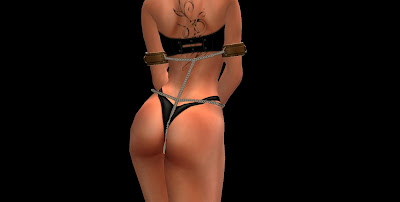 The chains
 The yoke
 The U-Binder
As for the legs... it gets even better. You have the usual loose chaining of the ankles to slow the sub down, a hogtie (the same one as in the Restrained Elegance Shackles), and not one but four spreader bars. Standing, sitting, laying down and hogtie, all with the legs spread widely apart. Like the yoke, the "Reshape" plugin allows you to resize the spreader bar without having to edit it by hand. Did I tell you this set was meant for training ? Hehe.
 Spreader bar, a classic
 Sitting on a spreader, try to get out of this one
 Moving around in this bondage is fun
Of course black might not be your color of choice... Fret not, you can customize the cuffs entirely. Main leather, straps, trim and metal parts can be colored independently through the "VixenTex" plugin. Most textures are color variations of the leather texture, but you also get a black latex texture and a brown cow hide texture.


And last but not least, the legs cuffs come with a little plus : the ability to lock high heels on with a small strap that goes under the sole. For long sessions of, uh, training, y'know. Of course since the set uses the RLV, the shoes are really locked on when the strap is applied. Moreso, since every heel is different, the "LockShoes" plugin embedded in the legs cuffs allows you to actually rotate and stretch the straps as you see fit.
 It does add some special look to the heels on top of it !
So if you combine everything, you get a quite devious set of sober but elegant leather restraints that is guaranteed to keep your little vixen squirming. Or perfectly still, if so is your choice.
Have fun !
Marine
I've been busy lately, and this blog post is going to show you what I've been busy on : a new product called the "Vixen Leather Training set".
Because it is leather, it is tight, it is sturdy, and it is definitely meant for training your favorite vixen, as you can see by looking at the pictures :

This set is very much like the Serious Shackles and the Restrained Elegance Shackles, and is to be used the same way. One collar, four arms cuffs, two legs cuffs. Oh and also a few bonuses...
For one, the collar is actually 4 collars in 1. The same object has 4 different appearances, a simple leather collar (looking very much like the cuffs), a classy version for everyday use, a medium posture collar and a high posture collar. See for yourself :
 Simple
 Classy
 Medium posture
 High posture
The cuffs also have a few surprises. Beyond the usual bondage (chaining the hands in front, behind the back or along the body), they come with two interesting pieces of equipment : a leather binder and a yoke. The leather binder binds the arms behind the back in a U, very useful for workout and ponyplay, while the yoke locks itself directly on the collar (the "Reshape" plugin allows you to resize the yoke to your shape). Told you this set was meant for training !
 The chains
 The yoke
 The U-Binder
As for the legs... it gets even better. You have the usual loose chaining of the ankles to slow the sub down, a hogtie (the same one as in the Restrained Elegance Shackles), and not one but four spreader bars. Standing, sitting, laying down and hogtie, all with the legs spread widely apart. Like the yoke, the "Reshape" plugin allows you to resize the spreader bar without having to edit it by hand. Did I tell you this set was meant for training ? Hehe.
 Spreader bar, a classic
 Sitting on a spreader, try to get out of this one
 Moving around in this bondage is fun
Of course black might not be your color of choice... Fret not, you can customize the cuffs entirely. Main leather, straps, trim and metal parts can be colored independently through the "VixenTex" plugin. Most textures are color variations of the leather texture, but you also get a black latex texture and a brown cow hide texture.


And last but not least, the legs cuffs come with a little plus : the ability to lock high heels on with a small strap that goes under the sole. For long sessions of, uh, training, y'know. Of course since the set uses the RLV, the shoes are really locked on when the strap is applied. Moreso, since every heel is different, the "LockShoes" plugin embedded in the legs cuffs allows you to actually rotate and stretch the straps as you see fit.
 It does add some special look to the heels on top of it !
So if you combine everything, you get a quite devious set of sober but elegant leather restraints that is guaranteed to keep your little vixen squirming. Or perfectly still, if so is your choice.
Have fun !
Marine
Subscribe to:
Posts (Atom)

 Posts
Posts

